
The starting point
Timesheet software for tradies records hours against jobs and gathers them for review. Axiom Blue job clock-on is on every plan, including limited free. Weekly timesheets, approval and approved-hours CSV export require Professional at $59 AUD for the first seat monthly. The CSV supplies hours to a payroll system; it does not calculate wages, interpret awards or lodge Single Touch Payroll.
Key facts
| What it does | Records time against each job as it happens, then builds each person’s week from it for sign-off. |
|---|---|
| Clocking on | Per job, in the Axiom Blue app or the web. With no signal, the time is kept and sent when the phone reconnects. |
| Where | When the phone shares its location, each clock-on and clock-off records where it happened, shown as a map pin on the entry. |
| The week | Filled from job time and approved leave. Travel, admin, training and breaks are added by hand (weekly timesheets are on Professional). |
| Sign-off | Submit with a comment; approve, or send back with a reason. Submitted and approved time is locked on the job. |
| Payroll | Approved hours export as a CSV, daily totals by type or every line, for your payroll system to import. No award interpretation. |
| Price | Job clock-on on every plan, including free. Weekly timesheets, approval and export on Professional, $59 AUD for the first seat per month. |
| What it does not do | Calculate pay, apply awards, lodge STP, or track where the crew’s vehicles are. |
What is timesheet software for tradies?
Timesheet software for tradies records who worked, when and on which job, then brings those entries together for review. Axiom Blue job clock-on is available on every plan; the weekly timesheet, approval and approved-hours export are Professional features. Keep recorded time, billable time and payroll calculations distinct: an approved hour is an input to payroll, not a calculated wage.
That matters twice over in a trade business. The same hours pay the crew and bill the customer. If the week is reconstructed on Friday, both are only as good as someone’s memory.
In Axiom Blue, time is recorded on the job, on the day, by the person doing it. The weekly timesheet is built from that record rather than typed alongside it.
Why do Friday timesheets come out wrong?
Because they are written after the fact, by someone reconstructing five days from a calendar, a few texts and a rough sense of how long things took. Three things go missing first: the drive between jobs, the half hour at the wholesaler, and the job that ran over and nobody noted.
The cost is not just the wrong pay. Hours written against the wrong job make that job look cheaper than it was, so the next quote is priced wrong. Hours that never make it onto a timesheet never make it onto an invoice either.
The fix is to record the time where it happens, as it happens, so the timesheet is a check of the week rather than a memory test.
How does the week fill itself in Axiom Blue?
The crew clocks on when they start a job and off when they finish, in the Axiom Blue app on their phone or in the web app. Pausing for lunch and resuming, or finishing the job, close and open the entry the same way. Each entry is on the job, with the person, the start and the finish.
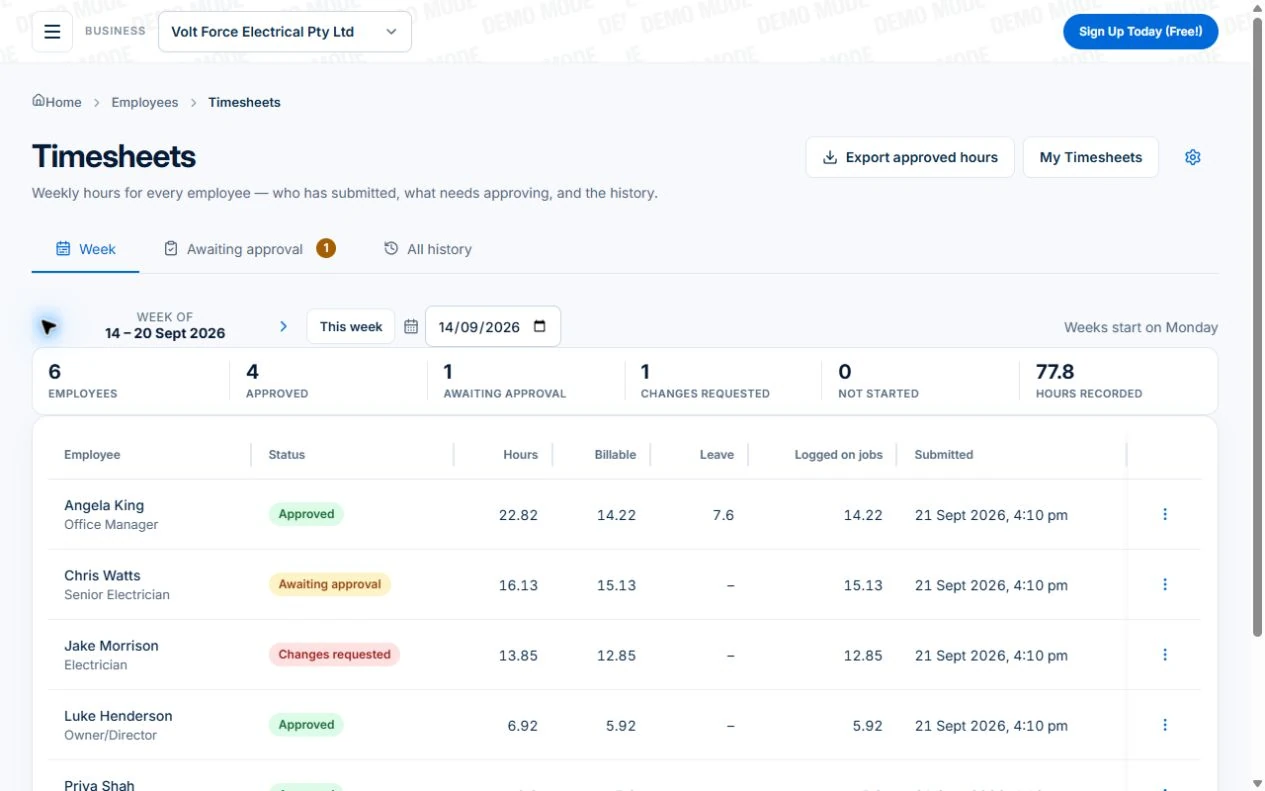
On the Professional plan, each person has a weekly timesheet, and it fills itself. Every job entry that week becomes a line, and approved leave appears as leave. The sheet shows the week at a glance, day by day: total hours, billable hours and leave hours. They add what didn’t happen on a job, such as travel, admin, training or other time, with a start and finish or just a number of hours. A break can go on any line.
You set which day your pay week starts. From then on, “this week” and “last week” line up with how you pay.
- Clock on and off per job, in the app or the web
- The week filled from job time and approved leave
- Travel, admin, training and other time added by hand
- Breaks on any line
- The week at a glance: total, billable and leave hours
Does it record where the time was recorded?
Yes, when the phone shares its location. In the Axiom Blue app, clocking on and off records where the phone was, as do starting, pausing, resuming and completing a job. On the job, and on the weekly timesheet, a pin beside the start or finish opens that point on a map.
It only happens if the person has already allowed the app to use their location. The app never asks just to clock on. Without permission, the entry has the times but not the place, and the timesheet works the same.
It is a record of where time was logged, not tracking. Nothing follows the crew between jobs or shows where a vehicle is. On the Professional plan, a ready-made automation can also clock people on when they arrive at a job site and off when they leave, using the phone’s geofencing, if location is switched on.
What happens with no signal?
The clock-on still happens. The app records it on the phone, with the time the button was pressed and, if shared, where. When the phone reconnects, the entry reaches the job with that time, not the time the signal came back. It works up to a week later, which covers a remote job with no coverage.
This is what makes job-first timesheets work on building sites, in plant rooms and on rural properties. A timesheet that only works with a signal gets written up later from memory, and then it is a Friday timesheet again.
How does sign-off work?
Each person checks their week and selects Submit, with a comment for the approver if there is something to explain. The sheet then waits in Awaiting approval. The approver opens it and either approves it or selects Request changes with a reason, which sends it back to the person to fix and resubmit.
Once a sheet is submitted, the job time on it is locked. Nobody can quietly change an hour on the job after the week has been signed for. If something genuinely needs correcting after approval, the approver reopens the sheet with a reason, and the history on the sheet shows who did what and when.
Approvers can approve many sheets at once from the list. Nobody can approve their own sheet unless they are an administrator.
- Submit, with an optional comment
- Approve, or Request changes with a reason
- Job time locks once submitted
- Reopen with a reason; the history keeps the trail
- Approve several at once; never your own
How do approved hours get into payroll?
As a spreadsheet. From Timesheets, Export approved hours asks for the pay period, starting on the last whole week, and a layout. Daily totals gives one row per person per day, with work, travel, admin, training, other and leave hours. Every line gives each timesheet line with its start, finish, break, hours, billable flag and job. Only approved sheets are included; a week still waiting isn’t ready to pay.
The file is for your payroll system to import, or for your bookkeeper to key from. Axiom Blue doesn’t apply award rates, penalty rates or overtime to pay, and doesn’t calculate wages or lodge Single Touch Payroll. Those belong in the payroll system, which is built for them. What Axiom Blue gives it is a week of hours the person submitted and the boss approved.
Exporting approved hours is on the Professional plan.
Read next Job invoicing software: bill from the job record →
What does an hour of your crew actually cost?
Every employee in Axiom Blue can carry a cost rate: what an hour of their time costs you, meaning their wage plus on-costs such as super and insurance. It sits apart from the rate their time is charged at on invoices, and customers never see it.
Each job then shows its labour at cost against what it charges: the recorded time at each person’s cost rate, materials at cost, and the margin. Unbilled time counts too, because it is still paid for. Each entry keeps the cost rate in force when it was recorded, so a pay rise doesn’t change what last month’s jobs cost. If no cost rate is set, their employee hourly rate is used and kept with the entry instead. Time with neither rate is shown as uncosted rather than free.
Read next Review job costs in AxiomBlue: quote against actual work →
What records does Fair Work expect you to keep?
Employers must keep time and wages records for seven years. They include the hours worked by casual and irregular part-time employees, and any overtime: how many hours, and when it started and finished. The records must be in English, and an employee or a Fair Work inspector can ask to see them.
Since 1 January 2025, intentionally underpaying an employee can be a criminal offence. Honest mistakes aren’t covered. A small business that follows the voluntary Small Business Wage Compliance Code can’t be referred for criminal prosecution over an underpayment.
An approved weekly timesheet is good evidence of hours worked: submitted by the person, signed off by the employer, with the history of any change. It is not a complete set of employment records, and it isn’t legal advice. Check what applies to your business with Fair Work.
Sources: Fair Work Ombudsman: Record-keeping · Fair Work Ombudsman: Criminalising wage underpayments
Which plan has what?
Recording time on jobs is on every plan, including the free plan. Weekly timesheets, sign-off and the payroll export are Professional, because they matter once there is a crew to approve. The free plan is for one user, with no time limit.
| Every plan (free, Basic $29) | Professional ($59) | |
|---|---|---|
| Clock on and off per job, in the app and the web | Yes | Yes |
| Where it was recorded, when the phone shares its location | Yes | Yes |
| Clocking on and off with no signal | Yes | Yes |
| Time entered by hand, with breaks and non-billable time | Yes | Yes |
| Job labour at cost rates, and the job’s margin | Yes | Yes |
| Weekly timesheets filled from job time and leave | No | Yes |
| Submit, approve, send back, lock | No | Yes |
| Export approved hours for payroll (CSV) | No | Yes |
| Leave requests | No | Yes |
| Automatic clock-on at site arrival | No | Yes (location on) |
| Utilisation and timesheet submission reports | No | Yes |
What does timesheet software cost in Australia?
Compare the same team, busy-month workload and required features. Include user types, job limits, GST, optional SMS, payment fees and any quoted implementation or training costs.
AxiomBlue’s first seat is $29 AUD per month on Basic or $59 on Professional, excluding GST. Additional seats have graduated discounts: the second is 10% off, third 20%, fourth 30%, fifth 40%, and sixth onward 50% off the first-seat rate. Paid plans have no job caps or per-job fees. SMS credits and payment-provider fees are separate where used.
For five seats, the factors are 1 + 0.9 + 0.8 + 0.7 + 0.6 = 4. Monthly billing totals $116 on Basic or $236 on Professional, excluding GST. Annual first-seat prices are $240 and $490; the same five-seat ladder totals $960 or $1,960 per year. These are subscription examples, not a claim of feature parity with another vendor.
Free is a one-user core-workflow test with 10 jobs per week, 10 quotes and 10 invoices per month, 25 customers and 25 leads. Uploads start on Basic. Crews, skills, leave, recurring series, variations, weekly timesheets, reports and automations require Professional. Inspect those in the live demo or test them on the required plan.
Read next Tradify vs Fergus vs ServiceM8 vs AroFlo vs Axiom Blue: an Australian job management comparison →
Sources: AxiomBlue plans and team pricing
Is Axiom Blue the right timesheet software for your business?
For an Australian trade or service business of two to twenty-five people that pays and bills by the hour, yes. Time is recorded on the job, on the day, by the person who did it, even with no signal. The week fills itself and is signed off and locked. Approved hours go to payroll as a spreadsheet, and each job shows what its labour really cost.
The limits, so you know them now. It doesn’t calculate pay, apply awards or lodge STP; your payroll system does that from the export. There is no direct connection to a payroll system yet. Weekly timesheets, sign-off, the export and leave are Professional. And the week is only as good as the clocking on, so the first fortnight is worth spending on getting the crew to clock on in the app.
Try it on last week
Use Professional or inspect the demo for weekly timesheets, approval and CSV export; Free supports core job time for one user.
Use a familiar working day and a change you actually need to handle. Check the recorded work, changed appointments and billing from the relevant roles. Compare what happened with what you intended before rolling it out.
Make it useful today
Print or keep a working copy.
Each resource includes a blank worksheet and an illustrative example. Open it to print, or download an HTML copy to keep. No signup needed.
Common questions
Questions people ask before they switch
What is the best timesheet app for tradies in Australia?
One that records time against each job as it happens, not a start and finish for the day. In Axiom Blue the crew clocks on and off each job in the phone app, even with no signal. On the Professional plan, each person’s week fills itself from that job time and approved leave, is signed off by the boss, locks, and exports for payroll. Job clock-on is on every plan, including free.
Can my crew clock on without mobile signal?
Yes. The Axiom Blue app records a clock-on or clock-off with no signal, keeping the time the button was pressed. When the phone reconnects, up to a week later, the entry reaches the job with that time rather than the time the signal returned.
Does Axiom Blue track where my crew is?
No. When the phone shares its location, clocking on and off records where it happened, shown as a map pin on the entry. The app never asks for location just to clock on, and nothing follows the crew between jobs or shows where a vehicle is.
Does it work out pay, awards and overtime?
No. Axiom Blue records hours and gets them approved; your payroll system calculates pay. On the Professional plan, approved hours export as a CSV, with daily totals by type or every line, for your payroll system to import. Axiom Blue doesn’t apply award rates, calculate wages or lodge Single Touch Payroll.
Can I approve timesheets before paying?
Yes, on the Professional plan. Each person submits their week; the approver approves it or requests changes with a reason. Once submitted, the job time on it is locked. An approved sheet can be reopened with a reason, and the sheet keeps the history.
How long do I have to keep timesheets in Australia?
Fair Work requires employers to keep time and wages records for seven years, including overtime hours and when they started and finished, and the hours of casual and irregular part-time employees. Approved Axiom Blue timesheets keep the hours with their history of submission and approval. Check what applies to you with the Fair Work Ombudsman.
Is there free timesheet software for tradies?
Axiom Blue’s free plan, with no time limit and no credit card, includes clocking on and off jobs, time entered by hand with breaks, and where time was recorded, for one user. Weekly timesheets, approval and the payroll export are on Professional, at $59 AUD for the first seat per month.
Put it to work
Your practical checklist
- Use Professional or inspect the demo for weekly timesheets, approval and CSV export; Free supports core job time for one user.
- Set each person’s cost rate on their employee record.
- Have the crew clock on and off every job in the app for a week, including one site with no signal.
- Add the week’s travel and admin to one timesheet by hand.
- Submit it, send it back with a reason, fix it, and approve it.
- Export the approved week as daily totals and open it next to your payroll system.
See the records in Axiom Blue
Try the workflow with a familiar job.
Features and usage limits vary by plan. Review the tools relevant to your process before choosing your setup.