
Choose a trigger
Start from the business event or scheduled check that should begin the process. Configure its conditions before adding a message.
Workflow automation / AxiomBlue
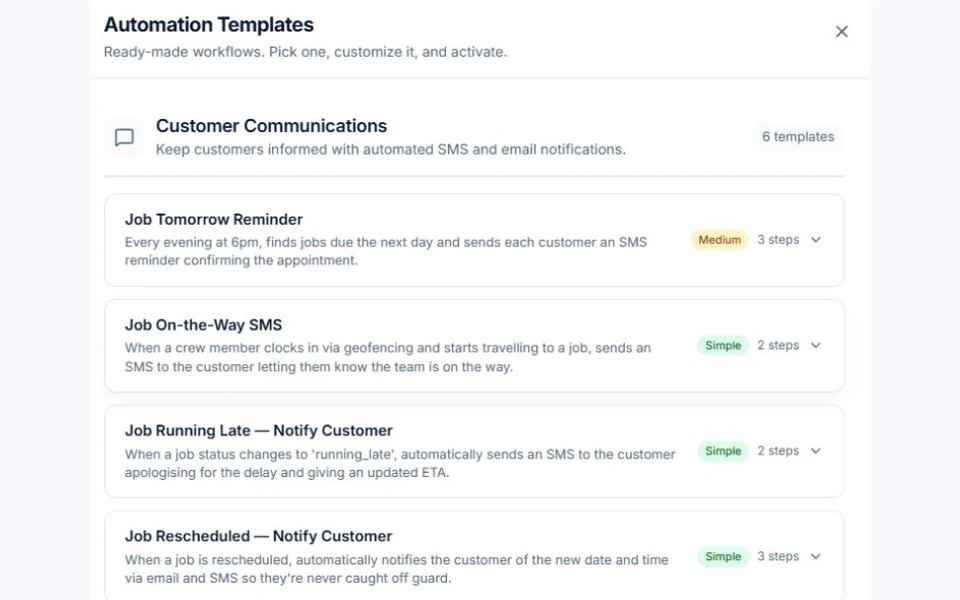
Build a workflow for a repeatable email task, such as following up a quote or checking an unpaid invoice. AxiomBlue Professional supports configured triggers, conditions, delays and actions. Review recipients and timing, test the exceptions and enable the workflow when it behaves as intended. Scheduled execution runs on the server; you do not need to keep the portal open.
Choose when the routine should run, then check what it actually sends.
Plan fit: Workflow automation requires Professional and a configured, enabled workflow. The monthly first seat is $59 AUD excluding GST; additional seats receive graduated discounts. SMS uses purchased business credits; external services may have their own setup and charges. Compare plans →
The part of your day this changes
Good intentions are easy to lose on a busy day. A configured workflow gives a repeated action a trigger, conditions and a next step, so the team can spend less time starting the same process again.
Start from the business event or scheduled check that should begin the process. Configure its conditions before adding a message.
Use supported scheduling or delay settings for the workflow. Confirm the relevant time zone and check execution logs; scheduled processing is not a promise of an exact send minute.
Try the normal case and changed records, such as an accepted quote or a paid invoice, before enabling follow-up for customers.
Picture it in your business / Example
Configure a quote follow-up and its wait, then test the recipient and quote state before enabling it. Try an accepted quote as well as one still awaiting a response. Review the execution and delivery result instead of assuming a delay by itself prevents an inappropriate follow-up.
A practical starting point
Pick one repeat email and name the person responsible for reviewing it.
Set the trigger, conditions, recipient and supported delay or schedule. Check the time zone used by the relevant setting.
Use normal, already-resolved and changed-record cases. Review the run log and actual message.
Enable the tested workflow on Professional and review failed runs and exceptions.
Know what’s included
Workflow automation requires Professional and a configured, enabled workflow. The monthly first seat is $59 AUD excluding GST; additional seats receive graduated discounts. SMS uses purchased business credits; external services may have their own setup and charges.
Compare plans, limits and pricing →Check the workflow in detail
Explore the detail
Availability varies with plan, permissions and enabled features. Check plan inclusions.
See how this fits: make it work your way →Before you get started
Have a specific workflow in mind? Talk it through with us.
Configured server workflows can run without the portal being open. Use supported schedule or delay settings and test the time zone and actual send result. There is no universal business-hours switch or guarantee of an exact delivery minute; a workflow delay alone does not establish every timing rule.
No. Workflows require Professional and a configured, enabled process. Review its conditions, recipients and timing and test exceptions before using it for live work.
The delay handler supports a fixed wait, a chosen time or a date field, depending on the workflow configuration. Check the time zone used for an until-time delay and inspect a test run before relying on it.
SMS uses purchased business credits. Check the available credits, recipients and message settings before enabling an SMS workflow.
Keep the work connected
Considering a switch?
Use a familiar job to compare the way you work today with the way Axiom Blue handles it.
Check the quote, schedule, job record and invoice. Look for the details your team needs.
Compare usage limits, paid seats and specialist features. See plans and pricing →
Try your own quote on the free plan. Before moving existing records, ask us about your data and setup needs.
Make the next step a small one
You know where the friction is in your business. Open the demo and see how AxiomBlue handles it. Then start with your own quote on the free plan.
Free plan has usage limits. No time limit. No credit card.
Try a quote like one you send every week. Check the detail your customer will see.
Explore a job, its crew, time and materials. Look for the information you usually chase.
Compare the features and limits you need. See plans and inclusions →