
Give the team the context
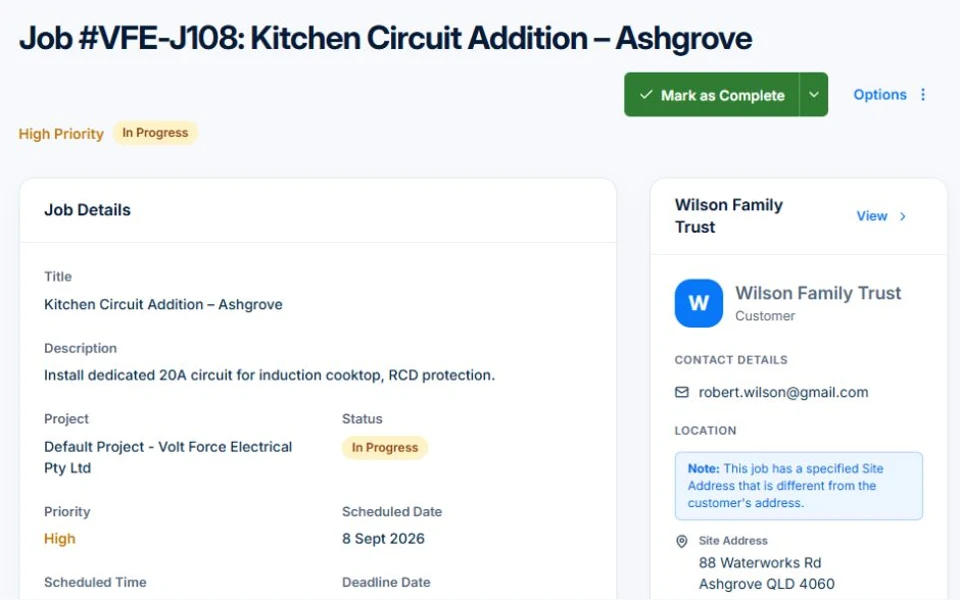
Keep the site address, description, tasks and notes with the job. Add photos and documents on paid plans to support the record.
Job management / AxiomBlue
AxiomBlue job management software connects the agreed scope, site details, assigned work, time and materials in a job record. Review what happened on site before preparing the invoice. Professional adds variations and approvals, so extra work has a record alongside the original agreement.
Less to reconstruct when the work is done and the invoice is due.
Plan fit: Core jobs, time recording and materials are included in Basic. Uploads start on Basic; variations, compliance and subcontractor management require Professional. Compare plans →
The part of your day this changes
An extra hour, another part, a customer request made on site: each is easy to forget when you write the invoice later. Record the work against the job while the details are still available.
Keep the site address, description, tasks and notes with the job. Add photos and documents on paid plans to support the record.
Track time and materials against the work. Review the recorded detail before you bill, rather than piecing it together from messages.
Professional variation tracking and approvals keep scope changes visible. Fixed-price billing follows the contract and approved variations; time-and-materials billing follows recorded work.
Picture it in your business / Example
Keep the new request connected to the existing job. Record the extra scope as a variation on Professional, seek approval and review its effect on the agreed contract before the next claim.
A practical starting point
Check the customer, site, schedule and description.
Add time, materials and notes as the work progresses.
Check the billing method, recorded work and any approved variations.
Know what’s included
Core jobs, time recording and materials are included in Basic. Uploads start on Basic; variations, compliance and subcontractor management require Professional.
Compare plans, limits and pricing →Check the workflow in detail
Explore the detail
Availability varies with plan, permissions and enabled features. Check plan inclusions.
See how this fits: protect your margin →Before you get started
Have a specific workflow in mind? Talk it through with us.
Yes. These are separate billing approaches. Fixed-price claims follow the agreed contract and approved variations; time-and-materials invoices use the recorded work.
Yes. Use recurring options and job series to organise regular service visits.
Photo and document uploads start on Basic. The free plan has usage limits and does not include file uploads.
Keep the work connected
Considering a switch?
Use a familiar job to compare the way you work today with the way Axiom Blue handles it.
Check the quote, schedule, job record and invoice. Look for the details your team needs.
Compare usage limits, paid seats and specialist features. See plans and pricing →
Try your own quote on the free plan. Before moving existing records, ask us about your data and setup needs.
Make the next step a small one
You know where the friction is in your business. Open the demo and see how AxiomBlue handles it. Then start with your own quote on the free plan.
Free plan has usage limits. No time limit. No credit card.
Try a quote like one you send every week. Check the detail your customer will see.
Explore a job, its crew, time and materials. Look for the information you usually chase.
Compare the features and limits you need. See plans and inclusions →