
The starting point
Choose job management software by running the same real job through each shortlisted tool: quote, schedule, record work, review costs and invoice. Compare the total for your team, phone access, plan inclusions, accounting handover and data exports. Axiom Blue’s limited free plan lets one user test the core workflow with no time limit; Basic is $29 AUD for the first seat monthly.
Key facts
| What this guide gives you | Six scoring questions and a scorecard you can run against any product on your shortlist. |
|---|---|
| How to test it | Run one ordinary job and one awkward change through each product using your own customers, prices and crew. |
| Axiom Blue price | Free plan with no time limit, then $29 AUD for the first seat per month (Basic) or $59 (Professional). Annual billing is $240 and $490 for the first seat per year. |
| Job limits on a paid plan | None. Paid plans have no job caps or per-job fees; there is no setup fee. |
| Free plan limits | One user, 10 jobs a week, 10 quotes and 10 invoices a month, 25 customers, 25 leads. No photo or document uploads. No credit card. |
| Where it runs | Native iPhone and Android apps, plus the full platform in any web browser, including on a phone. |
| Money side | GST follows registration and taxable lines. Accounts payable, reports and Xero/MYOB sync require Professional; job time and invoicing are available on every plan. |
| Where your data lives | Australian-hosted (Google Cloud, Sydney). Axiom Blue, ABN 68 852 461 832. |
Do not evaluate on a demo. Evaluate on your own jobs.
Compare job management software with one ordinary job and one awkward change using your own customers, prices and crew. Run both through the quoted plan, not a demo with every feature enabled. Axiom Blue’s free plan supports a one-user test of the core workflow; features such as variations, accounting sync and recurring series require Professional.
So change the test. Pick one ordinary job you have done a hundred times, and one job that went sideways: the extra work, the changed crew, the second visit. Run both through each product on your shortlist yourself, with your customer names, your prices and your GST. The awkward one matters more than the ordinary one, because the ordinary one works everywhere.
This used to be hard, because running a real job through software meant a card, a trial clock and a sales call. Axiom Blue publishes a free plan with no time limit and no credit card precisely so this test is possible: one user, 10 jobs a week, 10 quotes and 10 invoices a month, 25 customers and 25 leads. That is enough to put a fortnight of real work through it and find out what you think.
- One ordinary job, end to end: quote, schedule, on-site record, invoice, payment.
- One awkward job: a scope change, a reassignment or a second visit.
- Both jobs tested from the office account and from a field worker’s account.
- Both jobs tested on the phone your crew carries.
Question 1: What will the required plan cost your team?
Price the tasks and user roles you actually need before comparing headline subscriptions. Some plans bundle unlimited users and a job allowance; others charge for users or offer different field-worker roles. Ask about team pricing and optional costs.
AxiomBlue’s first seat is $29 AUD per month on Basic or $59 on Professional, excluding GST. Additional seats have graduated discounts: the second is 10% off, third 20%, fourth 30%, fifth 40%, and sixth onward 50% off the first-seat rate. Paid plans have no job caps or per-job fees. SMS credits and payment-provider fees are separate where used.
For five seats, the factors are 1 + 0.9 + 0.8 + 0.7 + 0.6 = 4. Monthly billing totals $116 on Basic or $236 on Professional, excluding GST. Annual first-seat prices are $240 and $490; the same five-seat ladder totals $960 or $1,960 per year. These are subscription examples, not a claim of feature parity with another vendor.
Use the same GST basis and busy-month workload. Separate setup, training and staff adoption time from the recurring subscription. Do not assume a lower price includes the same capabilities.
- How many jobs, quotes or invoices before the price changes?
- What does adding one apprentice cost, per month, all in?
- Is there a setup, onboarding or implementation fee?
- What is the annual price, and can you add and remove seats mid-year?
Sources: AxiomBlue plans and team pricing · Tradify Australian plans · Fergus Australian plans and user types · ServiceM8 Australian plans · ServiceM8 mobile platform information · AroFlo pricing
Question 2: Does one record carry the job from quote to receivable?
The expensive failure in a trade business is not a missing feature. It is the same information typed three times, once into the quote, once into the job, once into the invoice, with a chance to lose money at each step.
Build a quote from your price book, win it, and watch what happens. Does the quote become the job, carrying the scope, the line items and the customer? Does the crew’s time and materials land on that same record, and are those lines already on the invoice? Then break it: add the scope change halfway through. On Axiom Blue Professional, extra work can be recorded as a variation against the job, approved by the customer and carried through to the invoice. That is the failure this question exists to catch: the extra materials that got installed and never got billed.
The whole of Axiom Blue is built as one record, from the enquiry through quote, schedule, time, materials, variations, invoice and receivable, with GST applied automatically on every customer document. The customer gets a branded quote or invoice as a link they open in any browser to view, download and accept. No app, no login. Customers who want more can sign in to the customer portal to see their invoices, quotes, jobs and statement, but nothing obliges them to.
Question 3: Will the crew actually use it on the device they carry?
Software the field team avoids is a data-entry job for the office, dressed up as a subscription. This question decides more implementations than any feature comparison.
Test it as a worker, not as the owner. Log in on the phone your crew carries, open the assigned job, find the site instructions, take a photo, record a note and clock on. Then check from the office account that all four arrived. Do it with the reception you get on site, not the office wi-fi.
There are native Axiom Blue apps on the App Store and Google Play, free, and it is the same app on Android as on iPhone, which matters when half a crew is on each. The field workflow covers today’s schedule and job details, clock on and off (with where it happened, when the phone shares its location), photos and documents to the job record, materials, customers and leads, quotes, on-site invoicing and messaging. The whole platform also runs in any web browser, including on a phone, so a new starter can be working from a link on their first morning without installing anything, and the office desktop runs the same always-current app.
Then take it somewhere with no signal, because that is where most apps fail. Axiom Blue keeps six months of jobs on the phone, and starting or completing a job, adding notes and photos and ticking off tasks all work with no reception: each is marked as pending and syncs when the app is open and online. The limit is anything involving the customer and the money, so quotes, invoices and payments need a connection. Ask every vendor exactly which actions work offline, then check the answer on your worst site.
Question 4: Can you see whether the job made money while it is still running?
Most trade businesses find out whether a job was profitable weeks later, from the accountant, when nothing can be done about it. The point of job costing is to move that moment earlier, to while you can still act on it.
Ask each product to show you estimated versus actual cost on a job that is currently in progress. Not a report at month end: the live number on the job. Then ask what happens to that number when the crew records two extra hours and a trip to the wholesaler.
In Axiom Blue you see live estimated versus actual profit per job as time and materials are recorded against it. That is the number that tells you a job type is quietly underpriced while there are still nine more of them in the calendar.
Question 5: Does the money side reach your accountant without re-keying?
Be precise about what you need here, because vendors are loose with the word accounting. Most job management products are not accounting systems and should not pretend to be.
What you need is that invoices, payments, bills and GST arrive in your accounting system without being typed a second time. Axiom Blue supports quoting and invoicing on every plan, with GST following the business registration and taxable lines. Accounts payable, business reports, Xero/MYOB sync and approved-hours CSV export require Professional. The hours export is for your payroll system; Axiom Blue does not calculate wages.
What Axiom Blue is not, stated plainly so you do not discover it in month two: it does not lodge your BAS, run payroll or STP, produce a P&L or a balance sheet, or connect to a bank feed and reconcile your statements for you. It does keep a chart of accounts and import and categorise bank transactions, but your accounting system and your accountant still do the rest. Ask every other vendor on your shortlist exactly where that line sits for them, and be wary of a product that will not say.
Question 6: What does it cost to arrive, and what does it cost to leave?
Switching is the part people dread, and the fear is reasonable. It is also the part vendors are vaguest about, so it belongs on the scorecard as its own question.
Split your data into the parts that behave differently: customers, open quotes, jobs in progress, unpaid invoices, historical documents, your price book. Ask each vendor, in writing, which of those they import, in what format, who prepares the file and who checks the result. A vendor who says we’ll handle it without naming the format is telling you something.
Then ask the leaving question before you sign anything: how do you get your data back out, what does cancelling cost, and how long are you committed? Axiom Blue has no setup fee, no implementation charge, no minimum contract and no lock-in. Month to month, cancel any time. Your data is hosted in Australia, on Google Cloud in Sydney.
- Which records import, in what format, and who prepares the file?
- What is the setup or implementation fee, if any?
- What is the minimum contract, and what does cancelling cost?
- How do you export your own data if you leave?
The scorecard
Take these six questions to every product on your shortlist and make each vendor answer them specifically. A concrete answer you can check beats a tick in a feature grid. So the right-hand column below gives Axiom Blue’s answer as a fact you can go and verify, not a mark out of ten.
| Ask every vendor | What a good answer looks like | Axiom Blue’s answer |
|---|---|---|
| Does the price rise as I do more work? | A flat, predictable price with no job, quote or invoice meter on a paid plan. | Paid plans have no job caps or per-job fees; there is no setup fee. $29 for the first seat per month, excluding GST on Basic, $59 on Professional. |
| What does one more apprentice cost? | The cost of the required user role and plan, with any team discount. | Graduated seats: five seats total $116 Basic or $236 Professional monthly, ex GST. |
| Can I try it on my own real jobs first? | Genuine access to the real product with your own data, without a card. | Free plan, no time limit, no credit card: 10 jobs a week, 10 quotes and 10 invoices a month, 25 customers. |
| Does one record run quote to invoice? | The quote becomes the job, and site time and materials flow to the invoice without re-keying. | One record from enquiry through quote, schedule, time, materials, variations, invoice and receivable. |
| Where does extra work get recorded? | A named change on the job, approved by the customer, that reaches the invoice. | On-site variations with customer approval, carried through to billing. |
| What does my crew have to install? | A real app on both phone platforms, and a way to work without installing anything. | Native iPhone and Android apps, plus the full platform in any web browser including on a phone. |
| Can I see job profit before the job ends? | A live cost and margin figure on the job record itself, not a month-end report. | Live estimated vs actual profit per job as time and materials are recorded. |
| What does my customer have to do? | View, download and accept without creating an account. | A branded quote or invoice link they open in any browser. No app, no login. |
| Does GST and accounting carry over? | GST applied automatically, and a real sync with the accounting system you already use. | GST on every quote and invoice, two-way Xero sync, MYOB sync, timesheet hours export to payroll. |
| What does it cost to leave? | No setup fee, no lock-in, and a clear way to export your data. | No setup fee, no minimum contract, month to month. Australian-hosted data (Google Cloud, Sydney). |
Check the product depth on the plan you are testing
Inspect the records behind the feature names. Professional includes crew management, recurring series, variation approvals and workflows; those tasks need the demo or Professional access.
Free is a one-user core-workflow test with 10 jobs per week, 10 quotes and 10 invoices per month, 25 customers and 25 leads. Uploads start on Basic. Crews, skills, leave, recurring series, variations, weekly timesheets, reports and automations require Professional. Inspect those in the live demo or test them on the required plan.
AxiomBlue is one option to evaluate. Test the actual records and roles instead of treating a feature list or a lower price as proof that it fits.
Run the test this week
Pick your three products. Start the free plan on Axiom Blue, and get whatever equivalent access the others offer. Put a fortnight of new jobs through all three, the ordinary one and the awkward one, and score them against the six questions. Run it alongside your current system on new jobs only, so nothing in flight is at risk.
If Axiom Blue is the one that fits, you are already set up and your data is already in it. If it is not, you have lost nothing but the time, and you will know exactly why. That is worth more than another demo.
Common questions
Questions people ask before they switch
What is the best job management software for a small Australian trade business?
There is no single best product. The right one is the one that passes your own jobs. Score each on six things: whether the price rises with your workload, whether one record runs quote to invoice, whether the crew will use it on their phone, whether job profit is visible while the job is live, whether it syncs to your accounting system, and what switching costs. Axiom Blue offers a free plan with no time limit so you can run that test on real work.
How much does job management software cost in Australia?
Most Australian job management products charge per seat, and some meter jobs or charge an onboarding fee on top, so the headline price is rarely the bill. Axiom Blue is $29 AUD for the first seat per month on Basic and $59 on Professional, or $240 and $490 for the first seat per year on annual billing, with no job caps, no per-job fees and no setup fee. Five seats on Basic is $116 a month on monthly billing, ex GST.
Is there genuinely free job management software?
Yes. Axiom Blue has a free plan with no time limit and no credit card: one user, up to 10 jobs a week, 10 quotes and 10 invoices a month, and up to 25 customers and 25 leads. Its core features include leads, quoting, scheduling, invoicing, receivables, the price book, time tracking and the iPhone and Android apps. The exception is uploading photos and documents, which starts on Basic.
How long should it take to evaluate job management software?
Allow enough time to test ordinary work and the exceptions your business needs. A fortnight can be a useful pilot, but the required tasks and reconciliation determine when you have enough evidence. Advanced or multi-user tests require the appropriate plan.
Will my crew need to install an app?
With Axiom Blue, not necessarily. There are native apps for iPhone and Android covering the field workflow: today’s schedule, job details, clock on and off (with where it happened, when the phone shares its location), photos, materials, quotes and on-site invoicing. The full platform also runs in any web browser, including on a phone. A new starter can work from a link on day one without installing anything.
How hard is it to switch job management software?
It is manageable if you stage it. Run the new system alongside the old one on new jobs only for a fortnight, then bring customers and your price book across, set a changeover date, and finish open jobs where they already live instead of migrating work mid-flight. Ask every vendor in writing which records they import and in what format. Axiom Blue has no setup fee, no minimum contract and no lock-in.
Does Axiom Blue replace my accounting software?
No, and it does not claim to. Axiom Blue handles quotes and invoices with GST applied automatically, accounts receivable and payable, supplier bills, job profitability, and two-way sync with Xero plus MYOB sync, and on Professional exports approved timesheet hours as a CSV for your payroll system. It does not lodge BAS, run payroll or STP, produce a P&L or a balance sheet, or connect to a bank feed and reconcile your statements. Your accounting system and your accountant still do that.
Can customers see their quotes and invoices?
Yes, without an account. Axiom Blue sends branded quote and invoice links that the customer opens in any browser to view, download and accept, and invoices carry an online payment link. There is no app to install and no login for them to create, so the customer can review the document without creating an account.
Put it to work
Your practical checklist
- Use the demo or the required paid plan for multiple logins, variations and photos; use Free for a one-user core job test.
- Run one ordinary job end to end: quote, schedule, on-site record, invoice.
- Run one awkward job: add a variation, change the crew, check what reaches the invoice. Use the required plan or inspect the demo; Free supports one user.
- Test it from a field worker’s account, on the phone your crew carries, at a real site. Use the required plan or inspect the demo; Free supports one user.
- Score all six questions for each product, then cost it for the crew you expect in eighteen months.
See the records in Axiom Blue
Try the workflow with a familiar job.
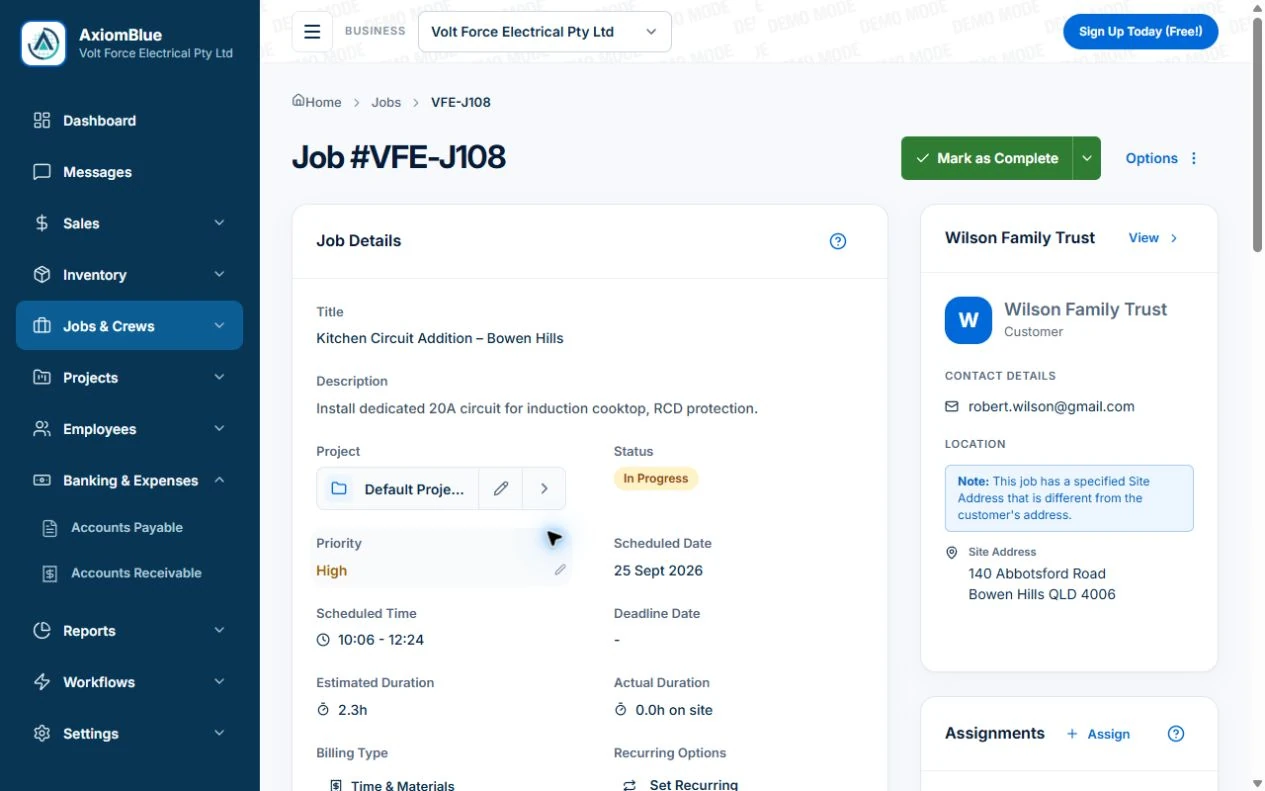
Features and usage limits vary by plan. Review the tools relevant to your process before choosing your setup.