Job management tools / Small trade & service businesses

Job management features.
Connected through the day.

Explore how AxiomBlue connects enquiries, quotes, job allocation, recorded work and invoices. Choose a workflow below, then check the individual tools and plan requirements.

Capture the opportunity. Organise delivery. Record the extras. Then give the customer a reason to make the next job yours.

For small trade and service businesses · Web, iOS & Android

The work is connected / Example journey

  1. 01An enquiry from your website or QR code
  2. 02A clear quote and an organised crew
  3. 03Recorded work, agreed extras and an invoice
  4. 04A customer who can check shared work and request the next job

Use the tools that fit your business, with deeper capabilities available as your needs grow.

The features worth a closer look

Useful on their own.
Stronger across the whole job.

These are the connections to explore when deciding whether AxiomBlue fits the next stage of your business.

Win more work / Forms + quoting + follow-up

Turn “How do I get a quote?” into a useful enquiry.

Put a lead capture form on your website, social profile or QR code. Ask for the details you need, then bring the enquiry into your sales process.

Build the quote, keep the opportunity visible and add a Professional workflow when you want a repeatable follow-up.

See lead capture forms →
Follow the path from enquiry to quote →
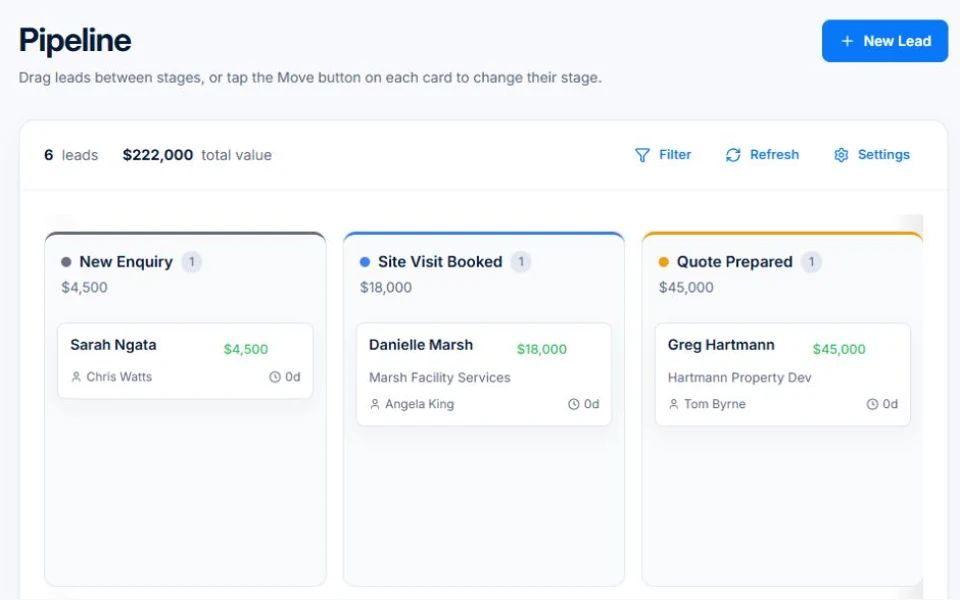
AxiomBlue · Sales pipeline · Professional
Public demo opportunities organised into enquiry, site visit and quote stages.
Keep the conversation moving after an enquiry arrives. Public demo · sample data

Organise delivery / Dispatch Map + crews + repeat visits

See where the work is.
Plan the next move.

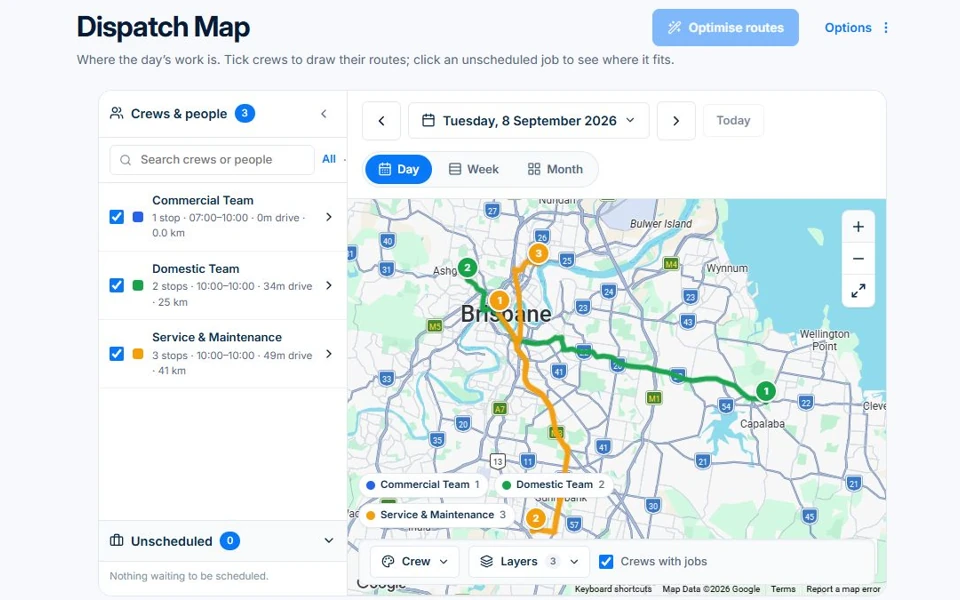
A calendar tells you when. Dispatch Map adds the location: view job stops and crew routes, then consider where a new call-out fits.

Keep recurring services in the plan alongside one-off work. Professional adds route optimisation for the crews you need to review.

Explore Dispatch Map →
Give repeat work a rhythm →
AxiomBlue · Dispatch Map
Public demo Dispatch Map showing crew routes and job locations.
Put location alongside the work already planned. Public demo · sample data

Protect your margin / Recorded work + agreed changes

Make sure the extras
have a place in the record.

Track time and materials against the job. Use Professional variations and approvals to record the scope changes that can otherwise disappear into messages.

Fixed-price billing follows the contract and approved changes. Projects and inventory add depth when the work calls for it.

Explore the tools behind the margin →

Illustrative fixed-price example

The agreement changes.
The record follows.

Original contract
$10,000
Approved variation
+ $1,200
Revised contract
$11,200

Amounts exclude GST. Review recorded costs and prior claims before the next invoice.

See variations and progress billing →

Make it work your way

Your business has details a standard form won’t ask for.

Professional custom fields give those details a consistent home on leads, quotes, jobs, projects and invoices. Workflows turn useful repeat processes into something the team can reuse.

Explore custom fields →
See workflow automation →

There’s more behind the everyday work

Find the detail
that matters to your trade.

Asset records, stocktakes, questionnaires, compliance records, team coordination and business reports all have a place in the wider platform.

Browse all 24 feature families →

Choose the depth you need.

Start with the free plan’s usage limits, use Basic for core daily work or explore Professional for advanced capabilities. Features and access vary by plan.

Compare plans and inclusions →
See examples for your industry →

Considering a switch?

Check the fit before
moving your business.

Use a familiar job to compare the way you work today with the way Axiom Blue handles it.

  1. 1. Follow a job in the demo

    Check the quote, schedule, job record and invoice. Look for the details your team needs.

  2. 2. Check your plan and team cost

    Compare usage limits, paid seats and specialist features. See plans and pricing →

  3. 3. Confirm your move

    Try your own quote on the free plan. Before moving existing records, ask us about your data and setup needs.

Make the next step a small one

Put a familiar job
through its paces.

You know where the friction is in your business. Open the demo and see how AxiomBlue handles it. Then start with your own quote on the free plan.

Free plan has usage limits. No time limit. No credit card.

  1. 01

    Price the work

    Try a quote like one you send every week. Check the detail your customer will see.

  2. 02

    Follow it through the day

    Explore a job, its crew, time and materials. Look for the information you usually chase.

  3. 03

    Check the fit and the price

    Compare the features and limits you need. See plans and inclusions →