
The starting point
Job management software connects the quote, schedule, work record and invoice for each job. Axiom Blue is built for Australian trade and field-service businesses, with iPhone, Android and web access. Test how recorded time and materials reach the invoice and how job costs are reviewed. A limited free plan is available; Basic is $29 AUD for the first seat monthly, excluding GST and Professional is $59.
Key facts
| What it is | One record per job, from enquiry to payment: quote, schedule, crew, site, time, materials, changes, invoice and payment. |
|---|---|
| Who it is for | Trade and field-service businesses, from a sole trader to a crew of twenty-five, who quote, schedule and invoice jobs. |
| How it differs from accounting software | Accounting software records the money after the fact. Job management software records the work that makes the money, and hands the invoices to your accounts. |
| Where it runs | Any web browser, and native iPhone and Android apps for the crew. |
| What the customer sees | Quotes and invoices by a link that needs no login, a job tracking link, and a customer portal. |
| Price | Free plan with no time limit, then $29 AUD for the first seat per month, excluding GST (Basic) or $59 (Professional). Paid plans have no job caps; there is no setup fee. |
| What it does not do | Payroll, BAS lodgement, bank feeds or a full set of financial statements. |
What is job management software?
Job management software keeps the agreed work, schedule, people, recorded time and materials, and billing connected to the same job. Axiom Blue uses that record to carry work from an accepted quote into a job and an invoice. CRM focuses on customer relationships, project tools on tasks and deadlines, and accounting tools on the financial records; check which handovers your business needs before choosing.
The test of it is simple. Pick any job and ask what was quoted, who went, when they got there, how long it took, what was used, what changed on the day, what was invoiced and whether it has been paid. In job management software, all of that is one screen. Without it, it is a phone call, a text search and a spreadsheet.
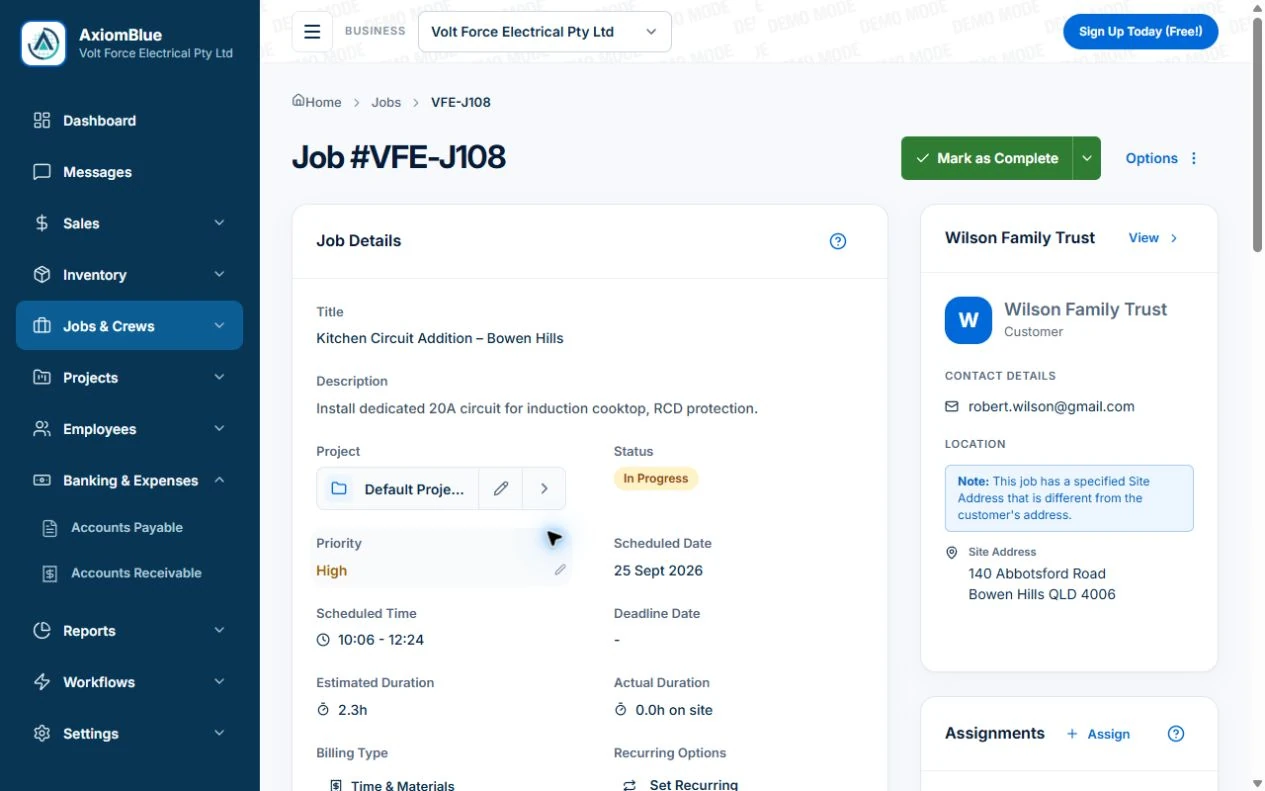
In Axiom Blue that record is the job. The quote it came from sits behind it, the invoice it produced sits in front of it, and everything the crew recorded on site is in between.
How is it different from field service management, project management, CRM and accounting software?
Each of those is built around a different record, and that decides what it does well. Job management software is built around the job and the money it makes. Field service management is built around dispatching technicians to assets under contract. Project management is built around tasks and deadlines. CRM is built around the customer and the sale. Accounting software is built around the ledger.
The overlap is real, which is why the terms get mixed up. What separates them is whether the software can take a job from a quote to a GST tax invoice with the crew recording the work on their phones in between. Only job management software is built to do all of that for a small trade business.
Axiom Blue sits in the first column. It has the parts of the others a trade business needs: customer and enquiry records, a Gantt view for multi-stage jobs on Professional, and accounts receivable (with payables on Professional), while syncing with Xero or MYOB for the books.
| Job management | Field service management | Project management | CRM | Accounting | |
|---|---|---|---|---|---|
| Built around | The job and its money | Technicians, assets and service contracts | Tasks and deadlines | Customers and the sale | The ledger |
| Quotes a job | Yes | Sometimes | No | Sometimes | Basic quotes, no job behind them |
| Schedules crews | Yes | Yes, often with optimised dispatch | Assigns tasks, not site visits | No | No |
| Crew records work on site | Yes, in a phone app | Yes | Rarely | No | No |
| GST tax invoice from the job | Yes | Sometimes | No | No | Yes, typed in, not from a job |
| Typical buyer | A trade business of 1 to 50 people | Mid-size and enterprise service operations | Office and project teams | Sales teams | Every business, via the accountant |
Where does accounting software on its own stop?
At the invoice. Xero or MYOB will record what you invoiced and what you were paid, and do it well. It will not tell you who is going where tomorrow, how long a job took, which materials went on it, or what the customer agreed to on the day, because none of that is accounting.
So a business running on accounting software alone keeps the rest somewhere else: a whiteboard for the week, a notebook for the hours, a text thread for the changes. The invoice gets typed from all three, and whatever did not make it into one of them does not make it onto the invoice.
Job management software fills the space before the invoice and then hands over. On Professional, Axiom Blue syncs customers, invoices and payments both ways with Xero and syncs invoices and payments with MYOB, so the books stay where your accountant wants them.
Why does the admin grow faster than the business?
Because every extra job adds handovers, not just work. One job is one quote, one booking, one set of hours and one invoice. Ten jobs a week with three people is thirty timesheets, the materials from three vans, the changes three customers asked for and ten invoices to reconcile against all of it.
Small businesses already carry a heavy admin load before any of that. The Australian Small Business and Family Enterprise Ombudsman, citing research by the Australian Chamber of Commerce and Industry, reports that 39% of small businesses spend more than six hours a week on compliance paperwork alone.
Job management software does not remove the work. It removes the retyping: a quote accepted once, hours recorded once on site, an invoice built from both. That is where the evenings go, and where they come back.
What happens to a job from first call to payment?
A job moves through the same stages in every trade, and each one leaves something on the record. The value of job management software is that each stage starts from what the last one recorded, instead of from someone’s memory of it.
In Axiom Blue a job moves through statuses you can filter and report on: pending, scheduled, in progress, paused, on hold, completed and invoiced (or cancelled). Here is what happens at each stage, who does it, and what the customer sees.
| Stage | What gets recorded | Who | What the customer sees |
|---|---|---|---|
| Enquiry | The customer, the site and what they need, as a lead | Office | A reply |
| Quote | Scope and price from your price book, with GST | Office or on site | A quote by a link they can open, accept or decline, with no login |
| Accepted | The quote becomes a job with the same lines | Office | A confirmation |
| Scheduled | Date, time, crew, required skills | Office | A booking; a tracking link if you send one |
| On site | Clock on and off, notes, photos, materials, tasks | Crew, in the app | The job’s progress on the tracking link |
| Change on the day | A variation with its price and approval (Professional) | Crew and customer | What they are agreeing to, and the price |
| Completed | Status, signature if captured, the finished record | Crew | The job marked done |
| Invoiced | An invoice built from the time, materials and approved variations | Office or on site | The invoice by a link, and the PDF |
| Paid | Payment recorded, or taken online (Professional with Stripe) | Customer, then office | The invoice shown as paid on its link |
Read next Job invoicing software: bill from the job record →
What does a job record hold?
Everything needed to do the job, and everything that happened while doing it, in one place a new starter could pick up. If the crew changes halfway through, the next person should not need a phone call to carry on.
In Axiom Blue that is the customer and the site address (which can differ from the billing address), the scope and description, required skills, the crew assigned and the schedule, tasks to tick off, notes (internal or shared), photos and documents, time recorded by each person, materials used, approved variations, signatures, and a change history on the job record. The job also shows its actual time on site against the estimate, and the person-hours behind it.
Photo and document uploads start on Basic. Custom fields, if you track something your trade needs that the standard record does not, are defined on Professional.
- Customer, site and scope
- Crew, schedule and required skills
- Tasks and notes
- Photos and documents (Basic and above)
- Time by person, and materials used
- Approved variations (Professional)
- Signatures and change history
Read next Use a job card in AxiomBlue →
How does the customer stay in the loop?
Without a phone call, ideally. Most of the calls a trade office takes are the same three questions: did you get my acceptance, when are you coming, and what do I owe.
Axiom Blue answers each in writing. Quotes and invoices go out by a link the customer opens in any browser with no app or login, where they can accept a quote or view and download an invoice. A job tracking link, sent by email or SMS, shows the job’s status, scheduled time and progress. It does not show where the crew’s vehicle is. And the customer portal, where a customer signs in by an emailed link, holds their quotes, invoices, jobs and job photos in one place.
Online card payment on an invoice is on Professional with Stripe connected. Text messages to customers are on paid plans and use SMS credits.
Can it run regular, repeat work?
Yes, on the Professional plan. Regular work, such as a monthly service, a fortnightly clean or a weekly mow, is set up once as a series, and the individual visits are generated from it, each one a job you can schedule, complete and bill.
A series can also be billed automatically: the customer authorises a card or a BECS direct debit account once, and each visit’s invoice is charged after it issues, into your own Stripe account. On any plan, a one-off job can still be copied, and job templates save retyping the jobs you do most often.
Read next Recurring jobs versus recurring invoices: keep visits and billing aligned →
How do you know whether a job made money?
By comparing what it was expected to cost with what it did cost, while it is still running rather than at the end of the quarter. That needs the actual hours and materials recorded against the job, which is the reason to record them in the first place.
Each Axiom Blue job shows its labour and materials against its price as they are recorded, and its time on site against the estimate. A job running over shows while there is still time to talk to the customer about it. Across the business, the dashboard carries a profit summary, and the business reports on Professional cover payment behaviour, recurring work and crew activity.
Read next Review job costs in AxiomBlue: quote against actual work →
What does job management software cost in Australia?
Most products charge per user per month, some charge by the number of jobs, and a few charge a flat fee. The model matters more than the headline price, because a trade business grows by adding people and doing more jobs, and each model charges for one of those.
Per-seat pricing costs more with every person you add, including field staff who only clock on and off. Per-job pricing costs more in your busiest month. Flat fees are predictable but usually come with a ceiling. Watch for setup or implementation fees, paid onboarding, minimum seat counts and features held back for a higher tier.
Axiom Blue is priced per seat, at $29 AUD per month on Basic and $59 on Professional, with no job caps, no setup fee and no minimum contract. The free plan has no time limit: one user, 10 jobs a week, and 10 quotes and 10 invoices a month.
Read next Tradify vs Fergus vs ServiceM8 vs AroFlo vs Axiom Blue: an Australian job management comparison →
How long does it take to switch?
About a week of evenings to be quoting and scheduling in it, and a fortnight of running it on new jobs before you rely on it. Less needs to move than most people expect.
Set up the business first: your details, ABN and GST registration, and how you want to be paid. Then your price book, because it is what you quote from. Then customers. Both import from a spreadsheet: save it as CSV, match its columns, and Axiom Blue checks every row (duplicates, email addresses, ABNs, incomplete addresses) before anything is added. On Professional, customers also come across from Xero when you connect it. Then send the crew the app or the sign-in link and put one real job through, start to finish.
Finish jobs already under way where they live, and leave history in the old system. Run new jobs in Axiom Blue for a fortnight, then set a changeover date. There is no setup fee or contract, so the switch costs time and nothing else.
Read next Best job management software in Australia: how to tell you have outgrown the spreadsheet →
Is Axiom Blue the right job management software for your business?
Axiom Blue is a candidate for Australian trade and service businesses that quote, schedule and invoice their own work. Run one familiar job through it before deciding: check the customer and scope, assign the work, record time and materials, then preview the invoice. The free plan is limited to one user; Basic is $29 AUD for the first seat monthly, excluding GST and Professional is $59.
The limits, so you know them now. It is not accounting software: it does not run payroll, lodge BAS, connect to your bank feeds or produce a full set of financial statements, and on Professional it syncs with Xero or MYOB for that. Variations, recurring series, online card payment, accounting sync, automations and business reports are Professional. And like any job management system, it is only as good as what the crew records, so the first fortnight is worth spending on getting everyone recording in the app.
Put one job through it
Take a job you did last week and run it through Axiom Blue from start to finish: the quote, the booking, the time and materials, the invoice. Then ask the question from the start of this page. What was quoted, who went, how long it took, what changed and what was paid. If it is all on one screen, you have seen what job management software is for.
The free plan has no time limit and needs no credit card.
Make it useful today
Print or keep a working copy.
Each resource includes a blank worksheet and an illustrative example. Open it to print, or download an HTML copy to keep. No signup needed.
Common questions
Questions people ask before they switch
What is job management software?
Job management software keeps one record for each job, from the first enquiry to the payment: the quote, the schedule, the crew, the site, the time and materials recorded on site, any agreed changes, the invoice and the payment. Axiom Blue is job management software built in Australia for trade and field-service businesses, on the web and on iPhone and Android.
What is the difference between job management software and field service management software?
Job management software is built around the job and the money it makes, from quote to GST invoice, for small trade businesses. Field service management software is built around dispatching technicians to assets under service contracts, usually for larger operations. Axiom Blue is job management software, with scheduling, a dispatch map and a crew app for the field work.
Is job management software the same as project management software?
No. Project management software organises tasks and deadlines for office teams, and does not quote, record time on site or produce a GST tax invoice. Job management software does. Axiom Blue does both where a trade needs it: jobs for the day-to-day work, and a Gantt view for multi-stage projects on the Professional plan.
Do I still need Xero or MYOB?
Usually, yes. Accounting software keeps the books; job management software runs the work that produces the invoices. On the Professional plan, Axiom Blue syncs customers, invoices and payments both ways with Xero and syncs invoices and payments with MYOB, so nothing is typed twice. It does not run payroll or lodge BAS.
Is there a job management app for my phone?
Yes. Axiom Blue has free native apps for iPhone and Android, and the whole platform also runs in any web browser, including on a phone. The crew sees their jobs, clocks on and off, adds notes, photos and materials, and completes jobs from the app. The core field actions work with no signal and send when the connection returns.
How much does job management software cost in Australia?
Most products charge per user per month, some by the number of jobs, and some add setup or onboarding fees. Axiom Blue is $29 AUD for the first seat per month, excluding GST on Basic and $59 on Professional, with no job caps, no setup fee and no minimum contract, and a free plan with no time limit.
How long does it take to set up job management software?
About a week of evenings to be quoting and scheduling in Axiom Blue: business details and GST, then your price book, then customers, then the crew. Customers and price book items import from a spreadsheet saved as CSV, and on the Professional plan customers also come across from Xero. Run new jobs in it for a fortnight before setting a changeover date.
Is there free job management software?
Axiom Blue has a free plan with no time limit and no credit card: one user, 10 jobs a week, 10 quotes and 10 invoices a month, with the same core quoting, scheduling and invoicing as Basic. File and photo uploads start on Basic, at $29 AUD for the first seat per month, excluding GST.
Put it to work
Your practical checklist
- Pick one job from last week and put it through from quote to invoice.
- Check you can answer who, when, how long, what was used and what changed from the job alone.
- Import your price book from a spreadsheet, or enter your ten most-quoted items first.
- Send one crew member the app and have them record one job on site.
- Send one customer a quote link and a tracking link, and ask what they saw.
See the records in Axiom Blue
Try the workflow with a familiar job.
Features and usage limits vary by plan. Review the tools relevant to your process before choosing your setup.