
The starting point
Choose job management software by testing your own quote-to-invoice workflow, the devices your team uses, accounting requirements and the total cost of the plan you need. Axiom Blue Basic starts at $29 AUD for the first seat per month for core job work and uploads. Professional starts at $59 for the first seat per month and adds accounting connections, recurring job series, variations and automation. The Free plan has usage limits and no uploads; accounting sync is not included on Free or Basic.
Key facts
| The test | If you cannot answer what was agreed, who is doing it and whether it was billed without ringing someone, the spreadsheet has stopped working. |
|---|---|
| What the software does | Keeps quote, schedule, site details, time, materials, invoice and payment together. Variations require Professional in Axiom Blue. |
| What it costs in Australia | Axiom Blue first-seat prices are $29 Basic or $59 Professional AUD per month, or $240 and $490 per year. Additional seats follow the published discount ladder; check the current team total. |
| What actually separates products | Compare the required plan, staff seats, job limits, onboarding and optional charges. Axiom Blue paid plans have no job caps or per-job fees. |
| Trying it against your spreadsheet | Free plan, no time limit, no credit card: one user, 10 jobs a week, 10 quotes and 10 invoices a month, 25 customers, 25 leads. |
| Who it suits | Australian trade and service businesses of roughly 1–25 people: electrical, plumbing, building, HVAC, landscaping, lawn care and cleaning. |
| The money side | Invoicing, receivables and job costing are core tools. Accounts payable, Xero and MYOB connections require Professional. Tax settings depend on your business’s registration. |
| Where it runs | Native iPhone and Android apps plus any web browser. Australian-hosted data (Google Cloud, Sydney). |
How do you know you have outgrown the spreadsheet?
A useful warning is that you cannot answer three questions without ringing someone: what did we agree with this customer, who is doing it and when, and has it been billed. A spreadsheet can hold the information, but keeping it consistent across people, messages and a calendar takes deliberate work.
The failure is rarely dramatic. It is a job finished in March and invoiced in May. It is the extra materials nobody wrote down. It is two versions of the same schedule, one on the office screen and one in a text message, disagreeing about Thursday. Each incident looks like a one-off and none of them feels like a reason to buy software, which is how businesses stay on spreadsheets for two years longer than they should.
Use the list below to identify recurring problems. Record the time spent fixing them and the value of work waiting to be billed, then compare that with software, setup effort and training. A count of problems alone does not establish the financial benefit.
- You cannot say what a finished job made without rebuilding it from memory.
- Work has been completed and never invoiced, or invoiced late enough to be awkward.
- Two people hold different versions of the same schedule.
- Quotes go out days after the customer asked, or not at all.
- Site details live in one person’s head, so their day off is a problem.
- You do your invoicing on Sunday night.
- You cannot find the photo, the message or the agreement from three months ago.
What is job management software, actually?
One record per job, from the first enquiry to the payment: the quote becomes the job, the job carries the schedule, the site, the time and materials and any agreed change, and the invoice is built from that record instead of typed again. For how it differs from accounting, field service management and project management software, and what happens to a job at each stage, see the full explanation of job management software.
What does "best" mean when every feature list is the same?
Similar feature names can hide different plan inclusions and workflows. An accounting integration listed on a product homepage may require a higher plan; a mobile app may support different tasks on different devices. Check the task and the plan together.
Start with four questions: can your team use it on their actual devices, can one record carry the job from quote to invoice, can you inspect the recorded costs, and what does the required plan cost for your team?
Pricing models differ. Some products charge per user; others include multiple users but limit new jobs. Check optional messaging, payment and onboarding charges separately. Do not compare a first-seat price with a whole-team price or assume every product uses the same model.
Axiom Blue charges for seats, with a discount ladder for additional seats. Paid plans have no job caps or per-job fees, and no setup fee. Professional is the appropriate comparison when you need its accounting connections or recurring work.
Read next Tradify vs Fergus vs ServiceM8 vs AroFlo vs Axiom Blue: an Australian job management comparison →
What does job management software cost in Australia?
There is no single per-seat market rate that makes every shortlist comparable. Ask each supplier for the cost of the plan that supports your required tasks, the staff who need access and your busiest month of jobs. Confirm the billing period, tax treatment and optional charges before comparing totals.
Axiom Blue’s first seat is $29 AUD per month on Basic or $59 on Professional. Annual first-seat prices are $240 and $490 respectively, billed yearly. Additional seats use the published discount ladder, so multiplying the first-seat price by your headcount overstates the current team subscription. Use the current pricing calculator for a team total.
For a sole operator who needs Xero or MYOB sync, compare the $59 Professional first-seat price rather than the $29 Basic price. For core quotes, scheduling and invoicing with photo and document uploads, Basic is the relevant starting point. Payment processing and other optional charges should be checked separately from the subscription.
The Free plan has no time limit and requires no credit card: one user, 10 jobs a week, 10 quotes and 10 invoices a month, 25 customers and 25 leads. It includes core quoting, scheduling, invoicing, receivables, price book, time tracking and mobile access. It has no photo or document uploads and no accounting connections. If your trial needs those tasks, Free alone cannot establish whether they suit you.
Which job management software is best for a small Australian business?
For a small Australian trade or service business, write down the tasks that must work before shortlisting software. Those may include quoting from saved prices, assigning a job, recording labour and materials, preparing the invoice, finding site history and connecting to your accounting system. The right choice depends on which tasks matter to your business.
In Axiom Blue, Free and Basic cover core quote-to-invoice work; Basic adds photo and document uploads. Professional adds Xero and MYOB connections, accounts payable, recurring job series, variations and automations. GST is applied through the business’s tax settings when registered; software does not decide your registration status.
Check competitor plan inclusions in their current documentation and try the same job in each shortlisted product. Avoid choosing on a headline price or assuming that every vendor’s accounting sync, recurring work or mobile tasks are identical.
The table below separates the plan decision from a feature checklist. Verify the full current inclusions and team price on the pricing page, then test the tasks you require.
| Task you need | Axiom Blue starting plan | What to test |
|---|---|---|
| Core quotes, schedule and invoices | Free, within its usage limits | Run one ordinary job without photo uploads or accounting sync. |
| Photo and document uploads | Basic | Add the files your office and field team need to the job. |
| Xero or MYOB connection | Professional | Check the supported records and sync direction for your accounting package. |
| Recurring job series and variations | Professional | Test your repeat-work schedule or an approved scope change. |
| Team access | Basic or Professional | Use the current pricing calculator and test each role on its actual device. |
Read next How to choose job management software in Australia →
What changes in your week once you move off the spreadsheet?
Test four handovers rather than assuming a time-saving result.
Build a quote from your saved prices and turn the accepted quote into a job. Check that the agreed scope is still easy to find.
Record labour and materials, inspect the invoice draft and reconcile it with the agreement before sending. If you need online card payment connections, check Professional and the payment provider’s charges.
Have the office find the field notes and, on Basic or Professional, uploaded photos without ringing the worker. Inspect the recorded job costs while work is running. Measure the effort against your current process rather than assuming the software removes every follow-up.
Will it work for my trade?
The pattern is the same across trade and service businesses even when the work is not. An electrician quoting a switchboard upgrade, a landscaper running a fortnightly maintenance round, a cleaner with twenty recurring commercial sites and a builder managing a staged project are all doing the same four things: agreeing work, scheduling it, recording what happened, and billing it.
What differs is which part carries the weight. In lawn care, cleaning and grounds maintenance the round is the business, so recurring schedules and the per-visit billing rhythm carry most of the weight. Building, landscaping construction and electrical fit-outs hang on the quote instead: variations and job costing are where that money is won or lost. For plumbers, HVAC techs and electricians on service work it is dispatch, site history and invoicing from the van.
Axiom Blue supports these patterns with different plan requirements: recurring job series and variations require Professional; core scheduling, job records, time and materials, and invoicing are available on lower plans. Test the tasks for your trade and check the plan rather than assuming every tool is included.
What happens to the data in my spreadsheet?
Less of it needs to move than you think, and none of it needs to move on day one. Split it into the parts that behave differently: your customer list, your prices, jobs currently in progress, unpaid invoices, and history.
Customers and prices are the two that matter, because they are what you need to quote tomorrow. Get those in first. Jobs in progress are usually best finished where they already are, not migrated mid-flight. Unpaid invoices belong to your accounting system, which is the record that matters for chasing them. History can stay in the spreadsheet. Keep the file; you are not deleting anything.
Run both systems on new jobs while you check the everyday workflow, and set a changeover date once the records reconcile. Axiom Blue has no setup fee or minimum contract, but allow time for cleaning your data, training the team and checking integrations.
How do you try it without risking anything?
Evaluate shortlisted software with your own work, alongside your current system.
On Free, take an ordinary job through quote, schedule, time and materials, and invoice within the usage limits. Use the phones your crew carries and the office browser. Then test the additional tasks on the plan that supports them: uploads on Basic, or accounting connections, recurring series and variations on Professional. Do not assume a Free-plan test covers those features.
Compare the finished invoice with what was agreed, ask a worker to find the site instructions and check that the office can follow the record. Use the result to decide whether to move more work across. Keep your existing records while evaluating.
| Check | Your current process | Test in shortlisted software |
|---|---|---|
| Job record | Where are scope, schedule and billing details kept? | Can office and field staff find the same agreed job details? |
| Quote to invoice | What must be typed again? | Does the draft bill reflect agreed work and recorded costs? |
| Devices | Which phones and browsers does the team use? | Can each role perform its required tasks on those devices? |
| Accounting | Which records need to move to your accounting package? | Check the required plan, supported records and sync direction. |
| Cost | Include time spent maintaining the current process. | Compare the whole team, required plan, limits and optional charges. |
Start with one real job this week
Pick one real job that shows the handovers you need to improve. Keep the existing record while you test the new workflow.
Start with the Free plan for core work if its limits suit the test. If uploads, accounting sync or recurring work are essential, include the appropriate paid plan in your evaluation and budget.
Axiom Blue has no setup fee and no job caps on paid plans. Basic starts at $29 AUD and Professional at $59 for the first seat per month; use the current team price before deciding.
Common questions
Questions people ask before they switch
What is the best job management software in Australia?
The best choice depends on your jobs, team devices, accounting requirements and budget. Test the same quote-to-invoice workflow in shortlisted products and compare the plan that supports your required tasks. Axiom Blue Basic starts at $29 AUD for the first seat per month; accounting connections, recurring job series and variations require Professional, starting at $59. Free has usage limits and no uploads or accounting sync.
How do I know when to stop using spreadsheets for job management?
A useful warning is that you cannot readily find what was agreed, who is doing the work and whether it has been billed. Track repeated problems such as late invoices, conflicting schedules and missing site details. Compare their cost and the effort of your current process with the subscription, setup and training needed; a fixed count of warning signs does not prove the financial benefit.
What does job management software cost in Australia?
Compare the required plan and whole-team cost, rather than a single market average. Axiom Blue first-seat monthly prices are $29 AUD on Basic and $59 on Professional; annual first-seat prices are $240 and $490. Additional seats use a discount ladder. Paid plans have no job caps or per-job fees. Check the current pricing calculator, tax treatment and optional payment or messaging charges.
Is there free job management software in Australia?
Yes. Axiom Blue’s Free plan has no time limit and needs no credit card: one user, 10 jobs a week, 10 quotes and 10 invoices a month, 25 customers and 25 leads. It includes core quoting, scheduling, invoicing, receivables, price book, time tracking and mobile access. Photo and document uploads start on Basic. Accounting connections, recurring job series and variations require Professional.
Do I have to move all my spreadsheet data across?
No, and you should not try to on day one. Move your customer list and your prices first, because they are what you need to quote tomorrow. Finish jobs already in progress where they are, leave unpaid invoices with your accounting system, and keep the old spreadsheet file for history. Then run both systems on new jobs for a fortnight before setting a changeover date.
Does job management software work for my trade?
Trade and service businesses share the steps of agreeing work, scheduling it, recording costs and billing. Test your own pattern: reactive call-outs, quoted work or repeat visits. In Axiom Blue, core job work is available on lower plans, while recurring job series and variations require Professional.
Will my team actually use it?
Test as a worker as well as the owner: open the assigned job on the phone your crew uses, find site instructions, record time and add a note. If photos are essential, test uploads on Basic or Professional. Axiom Blue runs on iPhone, Android and in a web browser; check each role’s tasks before changing the team’s process.
Put it to work
Your practical checklist
- Identify repeated problems and measure the effort of your current process.
- List required tasks, devices and accounting records before shortlisting.
- Compare the correct plan, team price, limits and optional charges.
- Test one real quote-to-invoice job and any paid-plan tasks you need.
- Reconcile the records and train the team before moving more work across.
See the records in Axiom Blue
Try the workflow with a familiar job.
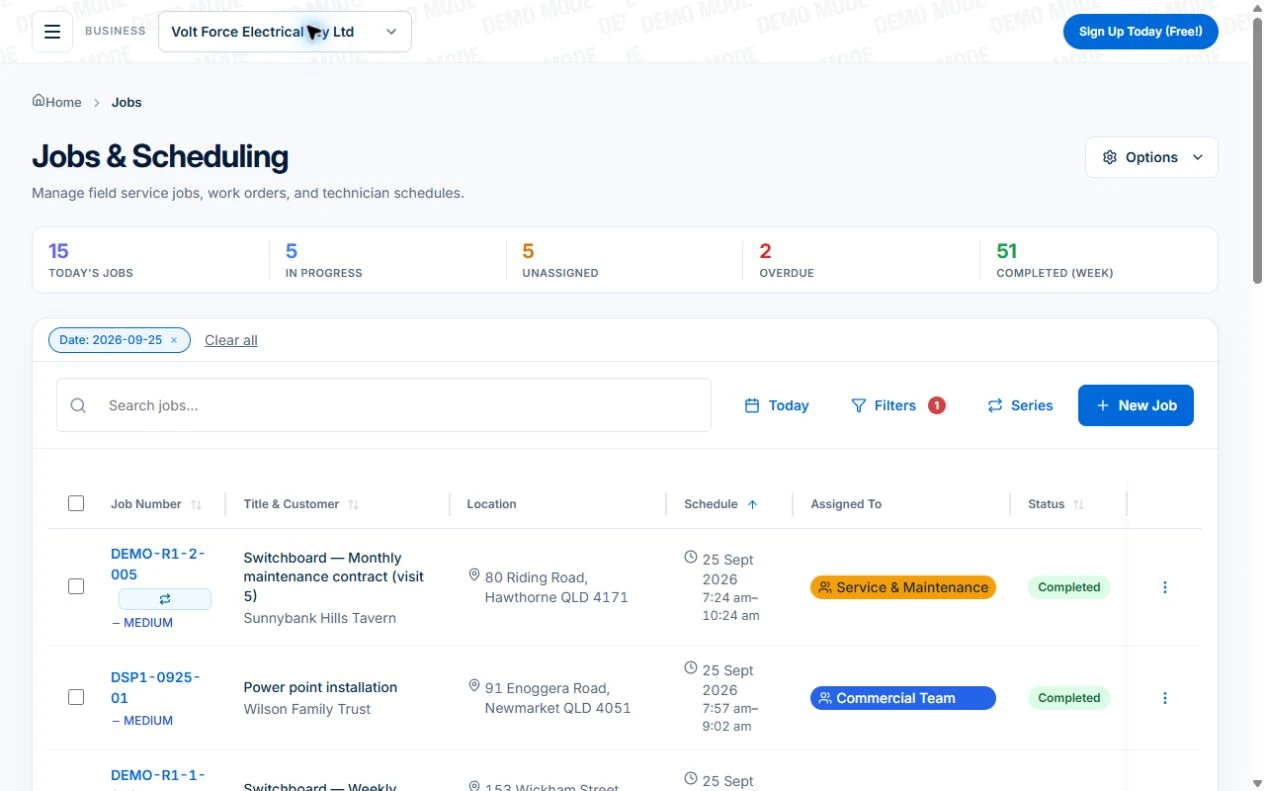
Features and usage limits vary by plan. Review the tools relevant to your process before choosing your setup.