
The starting point
A job management app puts assigned jobs on your phone and records the work against them. Axiom Blue offers iPhone and Android apps plus a web app. Core field actions queue offline in the native apps; quotes, invoices and payments need a connection. A limited free plan includes job time tracking, while photo uploads start on Basic at $29 AUD for the first seat monthly.
Key facts
| Platforms | Native apps on iPhone and Android, the same app on both, plus the full platform in any web browser. |
|---|---|
| No signal | Upcoming job records are stored on the phone. Supported offline changes are marked pending and retained if the app closes; they sync when the app is open and online. |
| Needs a connection | Quotes, invoices and taking payment. |
| Arriving on site | The app can record arrival and departure automatically using the phone’s geofencing, even with the app closed. Turning those into timesheets is a Professional automation. |
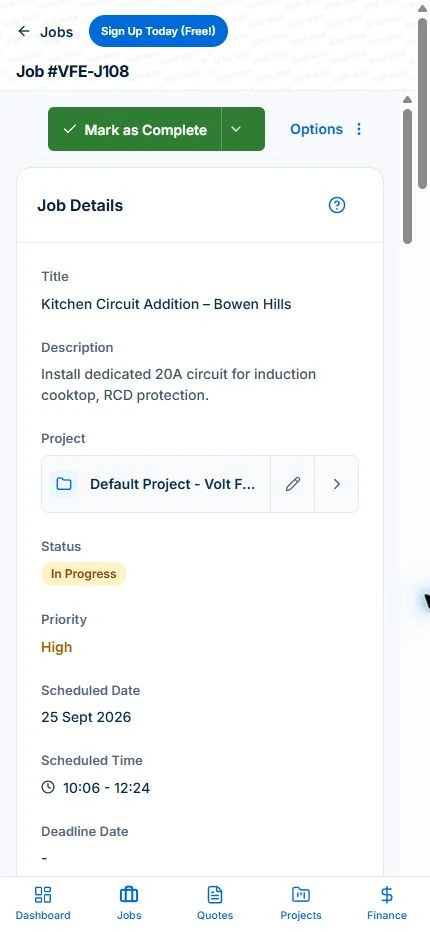
| On the job | Site details, one-tap Map and Call, time entries, materials, photos, notes, tasks and crew assignments. |
| Back to the office | Everything the crew records lands on the same job record the office sees, with push notifications for changes. |
| Price | Free plan with no time limit, then $29 AUD for the first seat per month (Basic) or $59 (Professional). No job caps. |
| Location | Optional. The app asks, and “Not now” is always an option. |
What is a job management app?
A job management app is the crew’s side of the business system. It shows each person the jobs they are on, the site and customer details, and what needs doing, and it sends back what actually happened: the time, the materials, the photos, the notes and the finished job.
It is not a cut-down copy of the office software. The test is whether someone can do a whole day of work from it without ringing the office and without typing anything the office then has to type again.
In Axiom Blue the app and the office platform share one job record. What the crew records on site is what the office sees, and what the office changes reaches the crew’s phone.
Why do crews stop using job management apps?
Three reasons, and a buyer rarely sees any of them in a demo.
It is slow, so the crew goes back to the group chat because a text is quicker than four screens. It fails where the work is, so the one site with no signal becomes the site where nothing gets recorded. And it makes them retype: the note written on the job has to be repeated in a text so the office sees it, and the time has to go on a paper sheet anyway.
Once the crew has a reason to work around the app, the office loses the only thing the app was for, which is knowing what happened without asking. So judge any app on the three failures, not on the feature list.
Does a job management app work with no signal?
Axiom Blue’s does, for the things a crew does on site, and it tells them honestly what has not sent yet.
The native app caches job records so you can open the available details without reception. Supported core actions, including job status, notes, tasks and job records, can be queued offline. Pending changes remain if the app closes and sync when the app is open and online. Test the specific actions you need at a site with poor reception; creating and sending invoices and taking payments need a connection.
The crew can see which items are still waiting: a note added at a dead spot carries a pending sync label until it has reached the office, so nobody has to guess whether the office has it. We tested this rather than taking it on trust: in flight mode, a note added to a job showed as pending, survived the app being force-closed, and reached the office once the phone reconnected.
The limit, plainly: quotes, invoices and taking payment need a connection, because they involve the customer and the money. A crew can finish and record the job at a dead spot, then send the invoice from the next place with signal.
Read next Best lawn care business apps for Australian crews →
Does the crew have to install anything?
Not to start. Axiom Blue publishes native apps on the App Store and Google Play, free, and it is the same app on iPhone and Android, which matters when half a crew is on each. The whole platform also runs in any web browser, including on a phone.
That means a new starter or a subcontractor can be working this morning from a link you text them, with nothing to download, and install the app later if they are staying. The office desktop runs the same platform, always on the current version.
Each person gets their own login and sees their own jobs, with permissions deciding what they can change. When someone leaves, their access goes with them.
What they see first matters more than any feature. Opening Axiom Blue shows the jobs already in progress with their running time, then today’s jobs, then what is coming up. Tapping a job gives the site address and the customer, with one-tap Map and Call at the bottom of the screen, then the tasks, time entries, materials, photos, notes and who else is on the job. It is built to be read standing up.
Can the app check the crew in automatically when they arrive?
Yes. With location switched on, the Axiom Blue app records when a crew member arrives at and leaves a job site, using the phone’s own geofencing on Android and iPhone. It works even when the app is closed, and where a site’s boundary has been measured it judges arrival against that boundary, not just a pin in the middle of it.
Those arrivals and departures are recorded on the job. On the Professional plan, two ready-made automations turn them into timesheets: one starts the timesheet when someone arrives on site, and the other closes it when they leave. The day’s hours then match where people actually were, with no clock-on to forget. The same arrival can trigger other automations too, such as one you set up to text the customer that the crew has arrived.
Location access is optional and the app asks for it rather than assuming. A crew member who says no can still clock on and off by hand; the entry then has the times but not where they were.
Can the crew quote and invoice on site?
Yes, when connected and with the appropriate user permission. The Axiom Blue app lets a crew member prepare a quote and invoice a completed time-and-materials job. GST follows the business registration and taxable lines. Every invoice has a no-login viewing link; online card payment requires Professional with Stripe connected.
Extra work found on the day is recorded against the job, so it reaches the invoice instead of being remembered on the drive home. Materials used are recorded as they are used. The customer gets the quote or invoice as a branded link that opens in any browser, with nothing to install and no account needed.
Preparing and sending quotes, creating and sending invoices, and taking payments need a connection in the published app. Core field actions such as time entries, job status, notes, photos and tasks can queue offline in the native app; test the actions your crew actually uses.
Read next Job invoicing software: bill from the job record →
How does the office know what happened on the job?
The same way the crew does: it is on the job. Time entries, materials, photos, notes, ticked tasks and the completed status all land on the job record the office is looking at, as they are recorded or as soon as the phone reconnects.
Push notifications carry things the other way, so a change or a message from the office reaches the crew’s phone without anyone ringing, and messaging keeps that conversation in the app instead of in personal texts.
That is what replaces the end-of-day phone round. The office stops asking what happened, because the answer is already there.
What should you check before rolling it out to the crew?
Four things, each of which a demo will not show you.
Test it at your worst site, not your best: the basement, the rural block, the plant room. Record a note and a photo there, then check the office has them when the app is open and online. Test it on both kinds of phone your crew carries, because an app that is good on iPhone and awkward on Android will be quietly abandoned by half the team.
Test the new-starter path. Send someone a sign-in link who has never seen the app and see how long it takes them to find their first job without help. That is the experience every apprentice and subcontractor will have.
And have the location conversation early. Automatic check-in is only as good as the permission behind it, and crews are right to ask what it is used for. Axiom Blue asks rather than assuming, says what the location is for, and still works with it switched off. Explaining that before rollout is worth more than any reminder afterwards.
Read next How to choose job management software in Australia →
What does a job management app cost in Australia?
Compare the same team, busy-month workload and required features. Include user types, job limits, GST, optional SMS, payment fees and any quoted implementation or training costs.
AxiomBlue’s first seat is $29 AUD per month on Basic or $59 on Professional, excluding GST. Additional seats have graduated discounts: the second is 10% off, third 20%, fourth 30%, fifth 40%, and sixth onward 50% off the first-seat rate. Paid plans have no job caps or per-job fees. SMS credits and payment-provider fees are separate where used.
For five seats, the factors are 1 + 0.9 + 0.8 + 0.7 + 0.6 = 4. Monthly billing totals $116 on Basic or $236 on Professional, excluding GST. Annual first-seat prices are $240 and $490; the same five-seat ladder totals $960 or $1,960 per year. These are subscription examples, not a claim of feature parity with another vendor.
Free is a one-user core-workflow test with 10 jobs per week, 10 quotes and 10 invoices per month, 25 customers and 25 leads. Uploads start on Basic. Crews, skills, leave, recurring series, variations, weekly timesheets, reports and automations require Professional. Inspect those in the live demo or test them on the required plan.
| Texts and paper | A desktop system’s mobile view | Axiom Blue app | |
|---|---|---|---|
| Today’s jobs with no signal | Whatever was in the last text | Usually needs a connection | Six months stored on the phone |
| Notes and photos at a dead spot | Taken, then forgotten | Lost or retried by hand | Saved and sent on reconnect |
| Arriving on site | Remembered, or not | Clocked on by hand | Recorded automatically; auto-timesheets on Professional |
| A new starter today | A group chat | An install and a login | A link, or the free app |
| Quote and invoice on site | Done that night | Varies | From the phone, with a payment link |
| What reaches the office | A phone call | Varies by screen | The same job record, as it happens |
| Cost for five people | Price the required plans and user types on the same GST basis. | Five seats: $116 Basic or $236 Professional per month, ex GST. |
Read next Tradify vs Fergus vs ServiceM8 vs AroFlo vs Axiom Blue: an Australian job management comparison →
Sources: AxiomBlue plans and team pricing
Is Axiom Blue the best job management app for a trade business?
Axiom Blue is worth testing if your trade or service crew needs jobs and field updates connected to the office record on both iPhone and Android. Check the native app at a site with poor reception, then confirm the pending updates arrive after reconnecting. Browser access gives another way to work, but the native app’s offline queue is a separate capability.
The limits: quotes, invoices and payments need a connection. Automatic timesheets from site arrival are a Professional automation. Photo and document uploads start on Basic. And like any app that uses location, it works best when the crew allows it, which is their choice.
Read next Job allocation software: preview crew assignments →
Text your crew a link tonight
Use Basic or above for multiple logins and photos; automatic timesheet workflows require Professional. Free supports one user.
Use a familiar working day and a change you actually need to handle. Check the recorded work, changed appointments and billing from the relevant roles. Compare what happened with what you intended before rolling it out.
Common questions
Questions people ask before they switch
What is the best job management app for tradies?
Choose a job management app by testing your crew’s actual phones, jobs and reception. Axiom Blue has native iPhone and Android apps plus a web app, with core field actions queued offline in the native apps. Quotes, invoices and payments need a connection. Job time tracking is on every plan; photo uploads start on Basic at $29 AUD for the first seat monthly.
Does the Axiom Blue app work offline?
For the core field work, yes. The app stores jobs from a week back to six months ahead on the phone, and starting or completing a job, ticking tasks, adding notes, uploading photos and sending messages all work with no signal. They are marked pending, kept even if the app is closed, and sent once the app is back online. Quotes, invoices and taking payment need a connection.
Is there a free job management app?
Yes. Axiom Blue’s iPhone and Android apps are free to download and the free plan has no time limit and no credit card: one user, up to 10 jobs a week, 10 quotes and 10 invoices a month, and up to 25 customers. It includes scheduling, quoting, invoicing and time tracking. Photo and document uploads start on the Basic plan at $29 for the first seat monthly, excluding GST.
Does my crew have to download an app?
No. The full Axiom Blue platform runs in any web browser, including on a phone, so a new starter can work from a link on their first morning. The native apps on the App Store and Google Play are free and the same on iPhone and Android for anyone who wants them.
Can a job management app clock my crew in automatically?
Axiom Blue records when a crew member arrives at and leaves a job site using the phone’s geofencing, even when the app is closed, judged against the site’s measured boundary where one exists. On the Professional plan, ready-made automations start a timesheet on arrival and close it on departure. Location access is optional; without it, crews clock on and off by hand and the entry records the times but not where.
Can my crew send invoices from the job site?
Yes, with a connection and the relevant permission. In the Axiom Blue app, preview and invoice a completed time-and-materials job, approve it and email the PDF and no-login viewing link. Online card payment requires Professional with Stripe connected. Without it, customers use the payment instructions on your invoice, such as bank transfer or PayID.
Does the office see what the crew does in the app?
Yes, on the same job record. Time entries, materials, photos, notes, completed tasks and job status recorded in the Axiom Blue app appear on the job the office is viewing, as they happen or as soon as the phone reconnects. Push notifications carry messages and changes back to the crew.
How much does a job management app cost in Australia?
AxiomBlue’s first seat is $29 AUD per month on Basic or $59 on Professional, excluding GST. Additional seats have graduated discounts: the second is 10% off, third 20%, fourth 30%, fifth 40%, and sixth onward 50% off the first-seat rate. Paid plans have no job caps or per-job fees. SMS credits and payment-provider fees are separate where used. For five seats, the factors are 1 + 0.9 + 0.8 + 0.7 + 0.6 = 4. Monthly billing totals $116 on Basic or $236 on Professional, excluding GST. Annual first-seat prices are $240 and $490; the same five-seat ladder totals $960 or $1,960 per year. These are subscription examples, not a claim of feature parity with another vendor.
Put it to work
Your practical checklist
- Use Basic or above for multiple logins and photos; automatic timesheet workflows require Professional. Free supports one user.
- Send each crew member the sign-in link, or the app store listing.
- Put tomorrow’s jobs on their phones and ask them to record in the app, not by text.
- Try one job in flight mode: add a note and a photo, then reconnect and check the office sees them.
- Switch on location for one person and look at the arrival and departure on the job.
- Invoice one finished job on site and watch the payment link come back.
See the records in Axiom Blue
Try the workflow with a familiar job.
Features and usage limits vary by plan. Review the tools relevant to your process before choosing your setup.