
The starting point
Job allocation software helps decide who should do each job; scheduling decides when it happens. Axiom Blue Auto Schedule proposes assignments for you to preview and apply, rather than moving work on its own. Auto Schedule is on every plan, including free. Basic is $29 AUD for the first seat monthly; crew, skill and leave management require Professional at $59.
Key facts
| What it does | Proposes who does each job, and when, from the unassigned queue. |
|---|---|
| What it checks | Required skills, approved leave, working hours, existing bookings, travel from each crew’s home base, and which crew already knows the customer. |
| Who stays in control | You. It shows a preview of every assignment with drive time, and nothing moves until you apply that plan. |
| An urgent call-out | Dispatch Map ranks where an unscheduled job fits best into each crew’s run. |
| A rain day | Move a whole day’s jobs to another day in one action, preview it first, and undo it if needed. |
| Plans | Auto-scheduling is on every plan including free. Crews, skills and leave requests are on Professional; on Free and Basic it plans each employee around their working hours, existing bookings and travel. Route optimisation for a crew’s run is on Professional. |
| Price | Free plan with no time limit, then $29 AUD for the first seat per month (Basic) or $59 (Professional). Paid plans have no job caps; there is no setup fee. |
| What it does not do | Reassign work on its own as the day changes, or show live GPS positions of your crews. |
What is job allocation software?
Job allocation software proposes suitable people for unassigned work. In AxiomBlue, the proposal uses recorded duration, bookings, working hours and travel. Professional adds crew skills and approved leave. Review the assignments and any work that could not be placed before applying.
That makes it a different question from scheduling, even though the two live on the same screen. Allocation decides who. Scheduling decides when, and in what order. A business can have a perfectly tidy calendar and still send the wrong electrician to a switchboard job, because the calendar only knew there was a gap.
In Axiom Blue the unassigned queue sits beside the crew rows on the Crew Calendar. You can drag a job onto a crew yourself, or select a batch and let the auto-scheduler propose where every one of them should go.
Why does allocating from a whiteboard keep putting good crews at the wrong house?
Because the person allocating is holding five things in their head at once, and the whiteboard holds none of them. Who has the ticket for this work. Who is off on Thursday. Who is already booked across town at two o’clock. Who the customer asked for last time. How long the drive actually is.
Most allocation mistakes are not bad judgement. They are one of those five facts being out of date or forgotten, usually late in the afternoon when the board is being built. The group chat makes it worse, because the decision gets made in one place and the detail lives in another.
Software fixes this by checking the facts every time rather than relying on memory. That is the whole value. It is not smarter than an experienced scheduler; it just never forgets that someone is on leave.
How does job allocation software decide who goes where?
It filters out the people who cannot do the job, then ranks the people who can by how well the job fits their day.
On Professional, AxiomBlue uses recorded crew skills and the job’s skill requirements alongside approved leave. The proposal also considers working hours, bookings, job duration and travel. Check deadline warnings and multi-day availability in the result. A recorded skill does not independently validate a licence or certification.
Then it weighs the fit. Travel is measured from each crew’s home base and between their jobs, so a job goes to the crew already working nearby rather than the one with the emptiest calendar. It also gives weight to the crew who has recently worked for that customer, because “we know this site” is worth something, though never so much that it outweighs a long drive. You can switch the main constraints on or off for each run.
- Required skills and certifications
- Approved leave and working hours
- Existing bookings on the calendar
- Travel from home base and between jobs
- Crews who already know the customer
- Deadlines and multi-day jobs
What does it need from you before the first run?
Four records, and the quality of its plan depends on them more than on anything else. Allocation software can only be as good as what it knows about your people.
On Professional, record the skills held by crews and the skills required by jobs. Keep those records current. Add home bases, realistic working hours, durations and approved leave so the proposal has usable inputs.
Skills, crews and leave requests are part of the Professional plan. On Free and Basic the auto-scheduler still places each employee around their working hours, what they are already booked for and the drive from their home base; it has no certifications or leave to check.
You do not need crews set up to begin. If a business has no crews configured, Axiom Blue schedules against individual employees instead and says so on the preview, which suits a three-person operation that has never needed to group anyone. Crews can come later, when there are enough people for them to matter.
Do you get to check the plan before it changes anything?
Yes, and this is the question to ask of any allocation software before you buy it. Automatic allocation that simply rewrites the calendar is how a business loses trust in the tool within a fortnight.
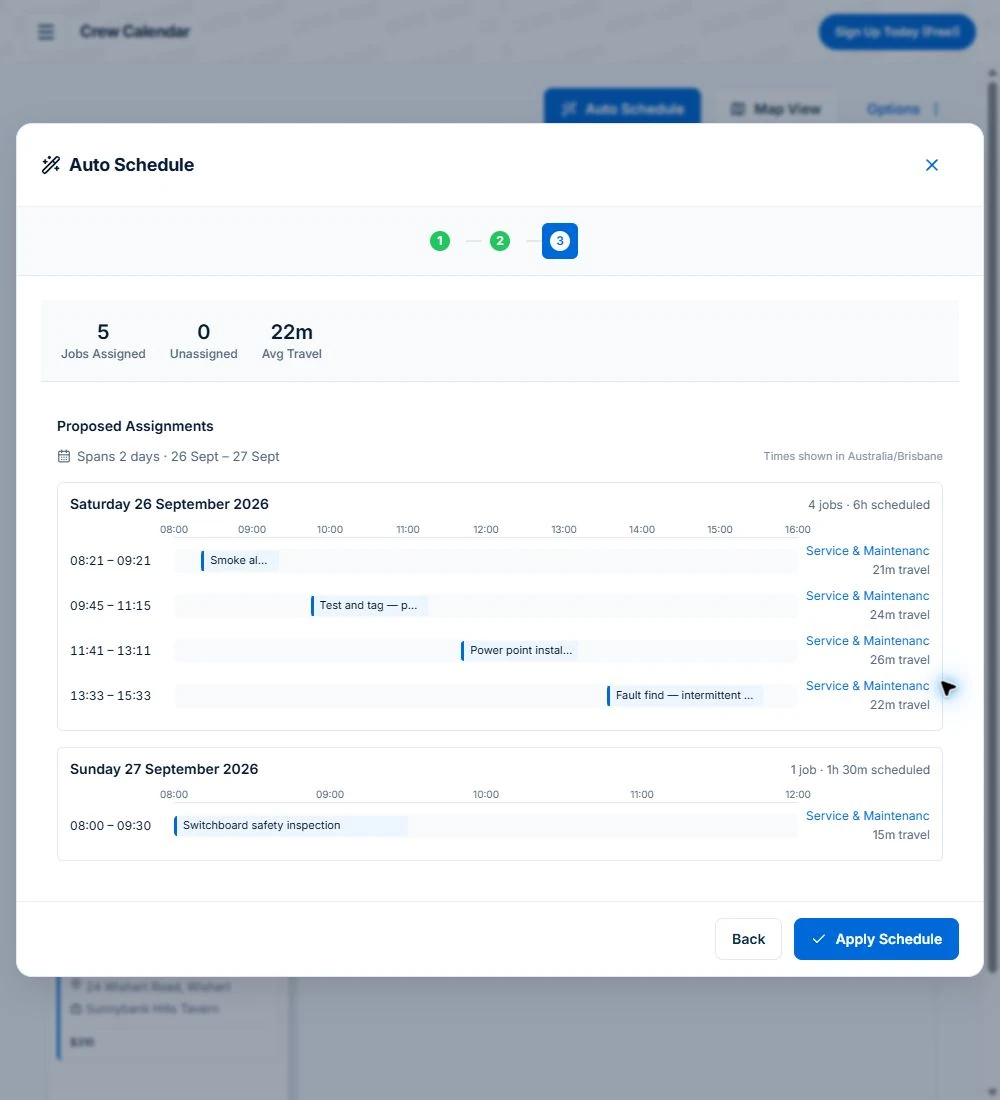
In Axiom Blue, auto-scheduling is three steps. You select the jobs, choose the constraints, and then see a preview: how many jobs were assigned, how many could not be, the average travel, and every proposed assignment laid out by day with the crew and the drive time next to it. Nothing on the calendar has moved at that point.
When you apply, it commits the plan you were looking at. It does not quietly re-solve and write a different answer. If the preview is wrong, you close it and the day is exactly as it was. That review step is what lets an office hand the first draft of tomorrow to the software while keeping the decision.
Review unplaced work and the reason shown in the preview. Missing recorded skills, insufficient availability or incompatible constraints can require a person to update the records or revise the plan.
What happens when an urgent call-out lands mid-morning?
You need to know which crew can absorb it with the least damage to everything else, and you need to know in about a minute.
On Axiom Blue’s Dispatch Map, clicking an unscheduled job ranks where it would fit into each crew’s run for the day, cheapest first. You see which crew it costs least to divert and what it does to their afternoon, then place it. The existing appointments stay visible, so you can see which customers would be affected before anyone is on the phone to them.
On the Professional plan the map will also propose a better order for a crew’s remaining stops once the call-out is in, and show the drive time that would save. Like the auto-scheduler, it proposes and you apply. Nothing reorders a crew’s day behind the dispatcher’s back.
The other half of a call-out is the customer whose appointment moved. From the job, you can send them a tracking link by SMS or email that shows the job’s status, its scheduled time and its progress, and opens in any browser with no app or login. It will not show where the crew’s vehicle is, but it stops the “are you still coming?” phone call.
What happens on a rain day?
For outdoor trades a wet morning can cancel an entire day, and rebuilding it job by job is an afternoon of work nobody has.
Axiom Blue can move a whole day’s jobs to another day in one action, using the same rules as the auto-scheduler for who can take what. You simulate it first to see where everything lands, apply it, and if the forecast changes you can undo it.
That last part is the one people do not expect. A bulk reschedule you cannot reverse is a decision you have to be sure of at 6am. One you can undo is a decision you can make quickly.
The customers still need telling, and that is where most of a rain day’s time really goes. Every moved job keeps its customer and site details, so the new date is on the record the office reads from, and a tracking link can go to each customer showing when their job is now booked.
Is job allocation different from job scheduling?
Yes. Allocation chooses the person; scheduling chooses the time and the order. You need both, and they fail differently.
Poor allocation shows up as the wrong person on a job: missing a certification, unfamiliar with the site, or driving too far. Poor scheduling shows up as a day that cannot absorb anything: no slack, appointments promised to customers that the crew cannot physically reach.
This page is about the software side of allocation. For the method of planning a crew’s day so it can handle change, including how much slack to leave and when to move a flexible job, the job scheduling guide goes into it properly: what happens to the plan when rain, a call-out or a job running over changes the day.
What does job allocation software cost in Australia?
Compare the same team, busy-month workload and required features. Include user types, job limits, GST, optional SMS, payment fees and any quoted implementation or training costs.
AxiomBlue’s first seat is $29 AUD per month on Basic or $59 on Professional, excluding GST. Additional seats have graduated discounts: the second is 10% off, third 20%, fourth 30%, fifth 40%, and sixth onward 50% off the first-seat rate. Paid plans have no job caps or per-job fees. SMS credits and payment-provider fees are separate where used.
For five seats, the factors are 1 + 0.9 + 0.8 + 0.7 + 0.6 = 4. Monthly billing totals $116 on Basic or $236 on Professional, excluding GST. Annual first-seat prices are $240 and $490; the same five-seat ladder totals $960 or $1,960 per year. These are subscription examples, not a claim of feature parity with another vendor.
Free is a one-user core-workflow test with 10 jobs per week, 10 quotes and 10 invoices per month, 25 customers and 25 leads. Uploads start on Basic. Crews, skills, leave, recurring series, variations, weekly timesheets, reports and automations require Professional. Inspect those in the live demo or test them on the required plan.
| Whiteboard and group chat | Shared calendar | Axiom Blue | |
|---|---|---|---|
| Who is qualified | In the scheduler’s memory | Not recorded | Required skills matched when configured; skill management is Professional |
| Who is on leave | Someone has to remember | A separate entry you check by eye | Approved leave considered when recorded; leave management is Professional |
| Drive time | Guessed | Not considered | Measured from home base and between jobs |
| Checking the plan | Read the board | Read the calendar | Preview every assignment before anything moves |
| A mid-morning call-out | Phone around | Look for a gap | Ranked by where it fits best in each crew’s run |
| A rain day | Rebuild by hand | Drag every job | Move the whole day, preview, undo if needed |
| Cost for five people | Price the required plans and user types on the same GST basis. | Five seats: $116 Basic or $236 Professional per month, ex GST. |
Read next Tradify vs Fergus vs ServiceM8 vs AroFlo vs Axiom Blue: an Australian job management comparison →
Sources: AxiomBlue plans and team pricing
Is Axiom Blue the best job allocation software for a small business?
Axiom Blue is worth testing when your dispatcher needs to review proposed assignments before applying them. Auto Schedule and Dispatch Map are on every plan; on Free and Basic you schedule people directly. Professional adds crew, skill and leave management and route optimisation. Test an unassigned job, a full day and a job the scheduler cannot place, then review the reason before committing the plan.
The limits, so you know them now. The auto-scheduler proposes and you apply; it will not reassign work on its own as the day changes. It has no live GPS view of where each crew is, so a call-out is ranked from where the crews are scheduled to be, not where their vehicles are. And the better the skills and home-base records you give it, the better its plan, so the first week is worth spending on setup.
Read next Best job management software in Australia: how to tell you have outgrown the spreadsheet →
Put tomorrow’s unassigned jobs through it
Use Professional or inspect the demo for crews, recorded skills and approved leave; Free and Basic allocate individual people.
Use a familiar working day and a change you actually need to handle. Check the recorded work, changed appointments and billing from the relevant roles. Compare what happened with what you intended before rolling it out.
Common questions
Questions people ask before they switch
What is job allocation software?
Job allocation software proposes who should do the work using job requirements and recorded availability. AxiomBlue considers duration, bookings, working hours and travel. Professional adds recorded crew skills and approved leave. You review the proposed assignments, warnings and unplaced work before applying.
How does automatic job allocation work?
AxiomBlue uses the job durations, bookings, working hours and travel you have recorded to propose assignments. Professional adds managed crews, recorded skills and approved leave. Review the proposed plan and any warnings or unplaced jobs before applying it; a skill record is not independent licence validation.
Will auto-scheduling change my calendar without asking?
No. Configure Auto Schedule, inspect its proposed assignments and apply the proposed schedule when it fits. Review a fresh proposal if the day or availability changes. The scheduler does not keep reallocating work unattended.
How do you handle an urgent job that comes in mid-morning?
On Axiom Blue’s Dispatch Map, clicking an unscheduled job ranks where it would fit into each crew’s run for the day, cheapest first, so you can see which crew it costs least to divert. On the Professional plan the map can then propose a better order for that crew’s remaining stops and show the drive time saved, which you review and apply.
Can I move a whole day of jobs when it rains?
Yes. Axiom Blue can reschedule an entire day’s jobs to another day in one action, using the same rules as the auto-scheduler for who can take what. You simulate the move first to see where every job lands, apply it, and undo it if the forecast changes.
What is the difference between job allocation and job scheduling?
Allocation chooses who does the job; scheduling chooses when and in what order. Poor allocation puts the wrong person on a job, missing a skill or driving too far. Poor scheduling leaves a day with no room to absorb a change. Axiom Blue handles both on the same Crew Calendar: the auto-scheduler allocates and times the work together, and you can adjust either by hand.
How much does job allocation software cost in Australia?
AxiomBlue’s first seat is $29 AUD per month on Basic or $59 on Professional, excluding GST. Additional seats have graduated discounts: the second is 10% off, third 20%, fourth 30%, fifth 40%, and sixth onward 50% off the first-seat rate. Paid plans have no job caps or per-job fees. SMS credits and payment-provider fees are separate where used. For five seats, the factors are 1 + 0.9 + 0.8 + 0.7 + 0.6 = 4. Monthly billing totals $116 on Basic or $236 on Professional, excluding GST. Annual first-seat prices are $240 and $490; the same five-seat ladder totals $960 or $1,960 per year. These are subscription examples, not a claim of feature parity with another vendor.
Does job allocation software track where my crews are?
Axiom Blue does not show live GPS positions of your crews. It allocates and ranks call-outs from where crews are scheduled to be, using travel measured from their home base and between their jobs. When the phone shares its location, clocking on and off in the mobile app records where it happened, which confirms a crew was at the job rather than tracking the vehicle.
Put it to work
Your practical checklist
- Use Professional or inspect the demo for crews, recorded skills and approved leave; Free and Basic allocate individual people.
- Record each crew’s skills and home base before the first run.
- Leave tomorrow’s jobs unassigned and run auto-schedule with skills, travel and hours on.
- Read the preview against the board you would have built, before applying anything.
- Try one mid-morning call-out on Dispatch Map and see where it ranks.
- Simulate a rain-day move and undo it, so you know how it behaves before you need it.
See the records in Axiom Blue
Try the workflow with a familiar job.
Features and usage limits vary by plan. Review the tools relevant to your process before choosing your setup.