
Key facts
| Repeating visits | Recurring job series are on Professional. Each visit has its own job record. |
|---|---|
| Day planning | Auto Schedule proposes a plan you review and apply. It is available on every plan. |
| Route order | Dispatch Map route optimisation is Professional and proposes an order you choose to apply. |
| Billing check | Review completed, moved and skipped visits against the customer’s agreed billing arrangement. |
| Plans | Limited free plan; Basic $29 and Professional $59 AUD for the first seat monthly, excluding GST. Paid plans have no job caps. |
Run a small mowing round through AxiomBlue
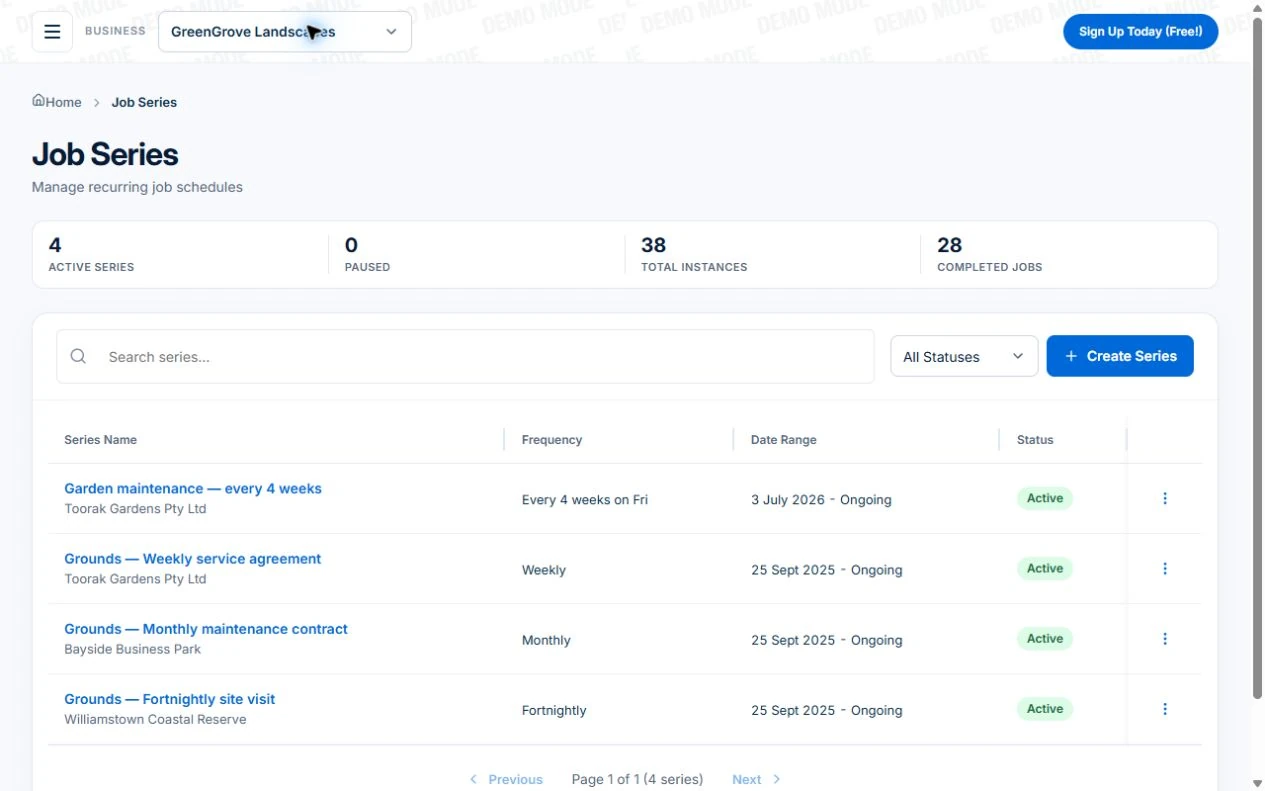
- Create a Job Series for each customer and property with the agreed frequency and scope. Put gate access, clipping removal and excluded areas in the job Description or Tasks for the native-app worker; keep private access information in your controlled process.
- Review the generated visits in Calendar & Schedule and Auto Schedule. For a wet day, use day rescheduling with only the relevant jobs marked weather-sensitive. Inspect proposed times, travel and unplaced visits before applying; confirm revised customer arrangements separately.
- Open each completed or skipped visit and record its actual outcome. For the month below, reconcile these jobs with the per-visit or monthly agreement and invoice draft. Treat an extra garden cleanup as separately agreed work, with Professional variations where appropriate.
How do you test a rain-day change without billing missed work?
Use a small sample round with one visit moved, one visit skipped and one extra garden job. Keep the original agreement visible, then check the individual job records and invoice preview. The following is an illustrative test, not an automatic billing rule in Axiom Blue.
| Visit | What to record | What to check before billing |
|---|---|---|
| A regular mow moved to Friday | The new date and the completed visit’s job record. | Bill the completed work once, against the agreed arrangement. |
| A mow skipped because no work was needed | The skipped visit and the reason. | Do not treat the planned date as completed work; apply the customer’s actual agreement. |
| Extra hedge work requested on a visit | Separate scope, price and approval before the work. | Check the extra work reaches the invoice without charging the regular visit twice. |
Read next Lawn-care invoicing: per visit, monthly billing and extra work → · Recurring jobs versus recurring invoices: keep visits and billing aligned →
Start with the service pattern and the site detail
List the customers whose work repeats and the intended frequency. Keep the actual service description, address and access notes with the customer or job so a different crew can understand what the visit involves.
A recurring schedule is a starting pattern. Season, weather and access may change the visit you actually deliver. The system should make it clear which scheduled job was changed instead of leaving an old appointment in one place and a new promise in another.
Review location as well as the calendar
Before adding another property, look at the crew’s existing work and the travel it creates. Jobs that look convenient as individual calendar gaps can produce an awkward day when the sites are far apart.
Axiom Blue combines recurring job series (Professional), a crew calendar and Dispatch Map. Use the map to review job locations and routes. Professional route optimisation is an additional tool to evaluate; the person planning the day still needs to check access and customer commitments.
Separate the regular service from the extra project
A regular mowing customer may ask for a garden clean-up or a larger refresh. Quote that work with its own scope and material quantities rather than quietly expanding the recurring visit.
Keep the maintenance series understandable while planning the additional work. If an agreed project changes again, record the extra and its approval before reviewing billing. This lets you see what belongs to the regular service and what was separately requested.
Evaluate billing alongside the round
Ask how you will confirm that a visit was delivered, review the work and prepare the invoice. A schedule full of future jobs does not mean those visits have been completed or paid.
In Axiom Blue, recurring visits, job records and invoicing are connected capabilities. Any automated billing process needs its own configuration and review. Check the plan and the actual workflow rather than assuming every recurring visit will automatically generate the right invoice.
Common questions
Questions people ask before they switch
Does lawn care scheduling software need recurring jobs?
For a repeating maintenance round, test recurring job series rather than only a calendar you copy each week. Axiom Blue recurring series require Professional, with each visit created as its own job to schedule, complete and bill. For occasional work, individual jobs and ordinary scheduling may be enough.
Does moving a lawn care visit mean it has been completed?
No. A new scheduled date is a plan, not proof of work. Check the individual visit’s completion and recorded work before raising an invoice. For skipped visits or monthly contracts, follow the actual billing agreement with the customer rather than assuming every scheduled visit should be charged.
Can a lawn care app rearrange a rain day?
Axiom Blue provides a Reschedule Day workflow with a preview and undo. You choose the new date and review the proposed moves before applying them. Dispatch Map route optimisation is a separate Professional feature; it proposes a stop order for you to accept rather than changing the day automatically.
Put it to work
Your practical checklist
- Open a recurring series and inspect individual visits.
- Change one visit without losing the customer’s detail.
- Review the crew’s job locations.
- Quote a one-off addition for a repeat customer.
- Trace one completed visit through billing.
See the records in Axiom Blue
Try the workflow with a familiar job.
Features and usage limits vary by plan. Review the tools relevant to your process before choosing your setup.