
The starting point
On-site invoicing means creating and sending an invoice from the job before you leave. In Axiom Blue, open a completed time-and-materials job on iPhone or Android, check the invoice preview, then create, approve and email it. The customer receives a PDF and a link that needs no login. Creating and sending an invoice needs an internet connection.
Key facts
| Invoice from the phone | On a completed job, Generate Invoice shows a preview of every line, the GST and the total. Create it, approve it and email it without going back to the office. Every plan, including Free. |
|---|---|
| What fills the invoice | Each person’s billable hours at your billing rate, billable materials at their sell price or cost plus markup, and approved variations (Professional). |
| Without signal | Clock on and off, notes, photos, materials and completing the job all queue offline. Creating and sending the invoice needs a connection. |
| Getting paid on the spot | Every invoice email carries the PDF and a no-login page with your bank transfer or PayID details. Record a cash, transfer or card payment against the invoice on the phone. Online card payment is on Professional. |
| Tax invoice rules (ATO) | Seven details under $1,000; add the buyer’s identity or ABN from $1,000. If a customer asks for a tax invoice, provide it within 28 days. |
| Card surcharges | Surcharging on eftpos, Mastercard and Visa debit and credit cards ends on 1 October 2026 (RBA). |
| Average wait to be paid | 22.9 days, and 6.0 days late on average (Xero Small Business Insights, June quarter 2026). |
Why invoice on site instead of from the office?
Because every day between finishing the job and sending the invoice costs you twice: once in the detail that gets forgotten, and again in the days before the money arrives.
Australian small businesses waited an average of 22.9 days to be paid in the June 2026 quarter, and were paid six days late on average. That clock does not start when you finish the work. It starts when the customer receives the invoice. An invoice written on Friday night for a Tuesday job has already added three days before the customer has seen it.
The detail suffers too. On site, you know the job ran an extra hour because the old isolator had to come out, and that the customer asked for the second tap. By Friday it is a line that says “plumbing works”, the extra hour is gone, and the customer who was happy on Tuesday now wants to know what they are paying for. Invoicing at handover means the customer sees the bill while they can still see the work.
What must an invoice sent from site include?
If you are registered for GST, the ATO sets the content of a tax invoice. For a sale under $1,000 it must make seven things clear: that it is intended to be a tax invoice, your identity, your ABN, the date it was issued, a brief description of what was sold including quantity and price, the GST payable, and the extent to which each item is taxable. From $1,000, it must also show the buyer’s identity or ABN. If a customer asks for a tax invoice, you must provide one within 28 days, unless the sale is $82.50 including GST or less.
If you are not registered for GST, send a regular invoice and do not call it a tax invoice. business.gov.au also recommends a unique invoice number, your contact details, and when and how you want to be paid.
Consumer law adds two rules that matter on site. A business must give a receipt for anything over $75. And a customer can ask for an itemised bill for a service within 30 days, which you must provide within 7 days, showing how the price was worked out, including labour hours and the hourly rate, and the materials used and what was charged for them. An invoice built from the job record is already itemised, so the question never becomes a dispute.
In Axiom Blue, every invoice carries your business details, your ABN and the GST, worked out automatically when your business is registered. The lines come from the job: one per person and rate for the time, one per material, and one per approved variation.
Sources: ATO: Tax invoices · business.gov.au: How to invoice · ACCC: Receipts, bills and proof of purchase
How do you invoice a job from your phone in Axiom Blue?
By recording the job as you do it, so that by the time you finish, the invoice is already written. The steps are the same on iPhone and Android.
- Clock on when you start. Each clock-on records billable time against the job. Location is saved at clock on and clock off only when you have allowed the phone to share it.
- Log materials as you use them. Each carries a sell price, or its cost plus your markup, and is billable unless you say otherwise.
- Record extra work as a variation and get it approved on the day (Professional). Approved variations are carried to the invoice at their agreed price.
- Complete the job. This works without signal: the completion, notes, photos and materials queue on the phone and sync when the app is open and online.
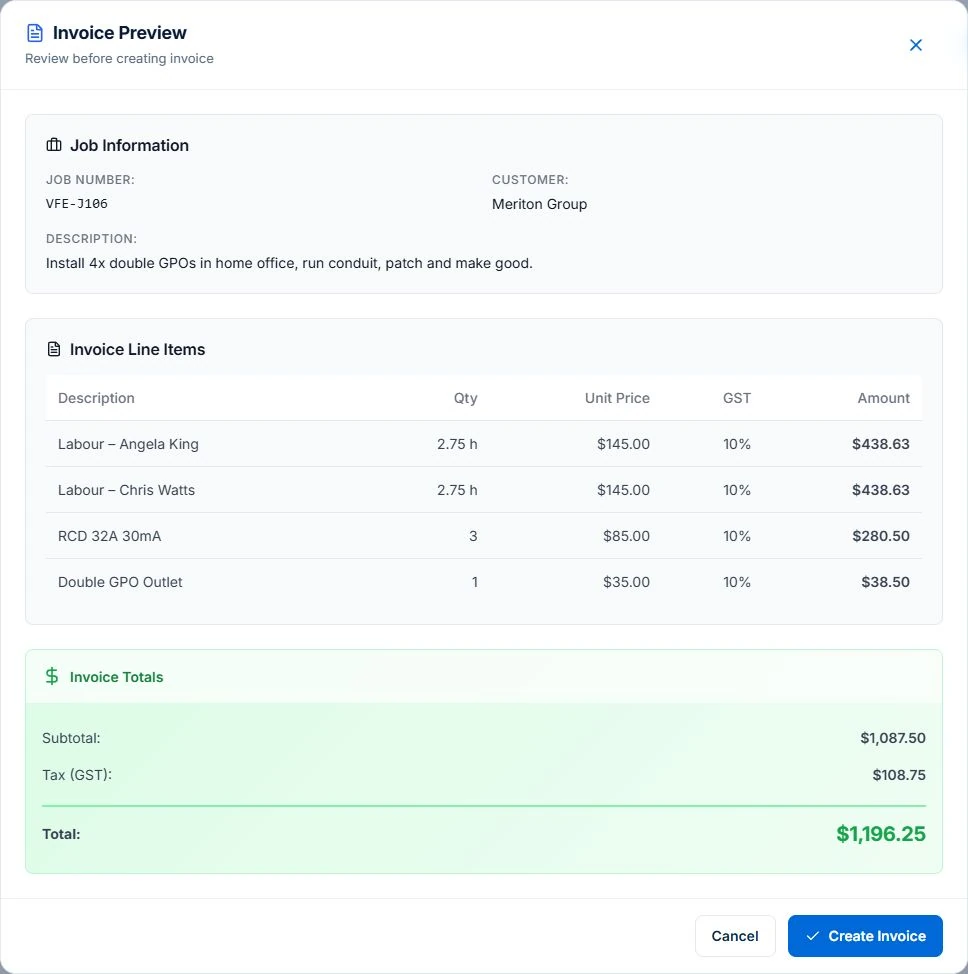
- Tap Generate Invoice. A preview lists every line with quantity and price, the GST and the total, and warns you if nothing on the job is billable yet.
- Create the invoice, approve it and email it. The customer receives the PDF and a link to a payment page that needs no login. You can also share the PDF from your phone’s share sheet.
What should you check before you press send?
The preview is the moment to catch the mistakes that cost you money or goodwill. Read it the way the customer will.
Check that everyone’s time is there and marked billable, including the diagnosis and the supplier run you would otherwise write off. Check that every part you fitted is on it at the right price. Check that the extra the customer asked for is an approved variation rather than a favour. And check that the customer and site are right, particularly on a strata or property manager job where the person who approved the work is not the person who pays.
The preview is read-only on purpose. If a line needs changing, change what the job recorded, or open the invoice in the Axiom Blue web app, which runs in any browser, including on your phone. Invoices raised from a job fall due on the customer’s payment terms, or 14 days after they are issued if none are set, and the email shows the due date.
Fixed-price work is different. The phone shows the contract, what has been claimed so far and what is left to claim, but deposits and progress claims are raised from the office, where the payment schedule lives.
How can the customer pay before you leave?
Give them a way to pay that suits them, then record it against the invoice so nobody chases money that has already arrived.
Every invoice email includes the PDF and a no-login page showing your “How to pay” details: bank transfer, PayID or the other methods you accept. When a customer pays in front of you, by cash or by transferring from their phone, record the payment against the invoice on your phone and the balance clears. Cash is still about 15% of consumer payments in Australia, and far more for some customers, so be ready to take it and record it.
On Professional, with card payments connected through Stripe, the payment page and the email also offer card payment online, so the customer can pay by card on their own phone while you pack up. Axiom Blue does not run a card reader or tap-to-pay on your phone.
Price for card costs rather than adding them at the end. From 1 October 2026, surcharging is being removed on eftpos, Mastercard and Visa debit and credit cards, and the card networks have announced no-surcharge rules from the same date. If card fees matter to your margin, build them into your rates, or offer a discount for another payment method, rather than adding a surcharge line.
Sources: RBA: Merchant card payment costs and surcharging, at a glance · RBA: Cash use in Australia (2025 Consumer Payments Survey) · business.gov.au: Payment terms
How do you stop an emailed invoice being hijacked?
By making your bank details boring: the same on every invoice, sent from the same system, and never changed by email.
Payment redirection scams cost Australians $166.8 million in 2025, the second-largest source of reported scam losses. The pattern is always the same. A scammer gets into an email account, or imitates one, and sends a copy of a genuine invoice with different bank details. The customer pays, and neither of you finds out until you chase the invoice.
Sending invoices from Axiom Blue helps in two ways. The invoice and its payment page come from one system, with the bank details from your payment settings, rather than from whichever inbox someone used that day. And every invoice points to the same payment page, so a customer can check the details there. Tell customers once, in writing, that you will never change your bank details by email, and ask them to call you on a number they already have if an invoice ever says otherwise.
Sources: ACCC: Targeting Scams report 2025 · Scamwatch: Business email compromise scams
What happens after you drive away?
The invoice becomes a balance to follow, and the office sees it the moment you send it.
Every plan tracks outstanding and overdue invoices and puts the overdue count on the home screen. Invoices are kept as records you can find again, which matters because the ATO expects most business records to be kept for five years.
On Professional, at $59 for the first seat monthly, excluding GST, you can review completed work that has not been invoiced. The Job Completed automation can create the draft invoice as soon as a job is marked complete, ready for someone to review. The Unbilled Work card lists every completed job that has not been invoiced, and a Weekly Unbilled Jobs Report arrives every Friday afternoon. The Overdue Payment Chaser emails the customer when an invoice passes its due date and tells you if it is still unpaid a week later. Invoices and payments sync two ways with Xero.
What it does not do, so you know now: Axiom Blue does not send invoices by SMS itself (share the PDF or link from your phone’s messaging app instead), does not let you edit invoice lines in the mobile app, and does not create or send invoices without a connection.
Read next Overdue invoice reminders: automate and review → · Job invoicing software: bill from the job record →
Sources: ATO: Record keeping for business
Common questions
Questions people ask before they switch
Can I send an invoice from my phone on site?
Yes. In Axiom Blue, a completed time-and-materials job has a Generate Invoice action on iPhone and Android. You see a preview of every line, the GST and the total, then create the invoice, approve it and email it with the PDF and a payment page link. It is on every plan, including the free plan.
What is on-site invoicing?
On-site invoicing is creating and sending the invoice from the job before you leave, built from the time, materials and approved extras recorded on the job, instead of writing it up later from memory. It shortens the time to be paid and reduces disputes, because the customer sees the bill while the work is in front of them.
Do I need mobile signal to invoice on site?
For the invoice itself, yes. In Axiom Blue, clocking on and off, notes, photos, materials and completing the job all work without signal and sync later. Creating, approving and sending the invoice need a connection, so in a dead spot, complete the job and send the invoice from the first place with coverage.
Can a customer pay by card on site?
Axiom Blue does not run a card reader or tap-to-pay. On Professional, with card payments connected through Stripe, the invoice’s payment page lets the customer pay by card on their own phone. On every plan you can record a cash, bank transfer or card payment against the invoice on your phone. From 1 October 2026, card surcharges on eftpos, Mastercard and Visa are being removed.
What must a tax invoice include in Australia?
For a sale under $1,000, the ATO requires seven details: that it is intended as a tax invoice, the seller’s identity and ABN, the date issued, a description with quantity and price, the GST payable, and the extent each item is taxable. From $1,000, add the buyer’s identity or ABN. If a customer asks for a tax invoice, you must provide it within 28 days.
Can I invoice a fixed-price job from site?
Not from the phone. The Axiom Blue mobile app shows a fixed-price job’s contract, what has been claimed and what is left, but deposits and progress claims are raised in the web app, where the payment schedule lives. Time-and-materials jobs can be invoiced from the phone.
Put it to work
Your practical checklist
- Clock on and off every job in the app for a week, and log materials as you use them.
- Invoice your next finished job from the site with Generate Invoice before you drive away.
- Read the preview as the customer would: time, parts, extras and the right customer.
- Put your bank transfer or PayID details in your payment settings, and tell customers you never change them by email.
- Record the payment on your phone when a customer pays in front of you.
See the records in Axiom Blue
Try the workflow with a familiar job.
Features and usage limits vary by plan. Review the tools relevant to your process before choosing your setup.
Product instructions
Published by Axiom Blue. Tax invoice, consumer law, payments and scam figures come from the ATO, business.gov.au, the ACCC, the RBA and Xero as cited, checked 25 September 2026. This is general information, not tax or legal advice.