
See the shape of the work
Use a Gantt view to lay out tasks across time and connect dependencies where one piece of work relies on another.
Project management / AxiomBlue
AxiomBlue Professional gives larger jobs and client engagements a project plan: phases, tasks, dates and dependencies in a Gantt view, with kanban tickets for work in progress. Use sprint planning where it suits your team, and keep the project plan alongside the job records used for delivery and billing.
Keep the next stage visible while today’s work gets done.
Plan fit: Project management, kanban tickets and sprint planning are Professional features. Core job scheduling is available on Basic. Compare plans →
The part of your day this changes
One task needs finishing before another can begin. Different people own different pieces of the work. Put those pieces into a project plan so the hand-offs are easier to see.
Use a Gantt view to lay out tasks across time and connect dependencies where one piece of work relies on another.
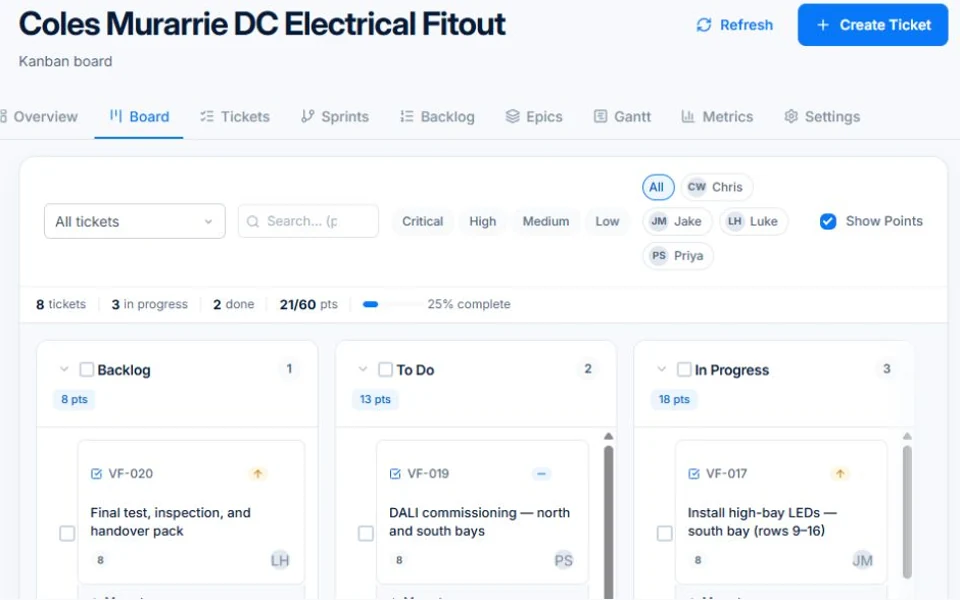
Organise tickets on kanban boards, update their status and give the team a shared view of work still to do.
Keep a simple task board for straightforward delivery or use sprint planning for teams that organise work in shorter cycles.
Picture it in your business / Example
Set out the preparation, installation and finishing tasks. Add the relationships between stages, then use the board to follow individual pieces of work as they move towards completion.
A practical starting point
Set out the work, dates and delivery context.
Create the tickets and stages that make the work manageable.
Use the board and Gantt views to check progress and dependencies.
Know what’s included
Project management, kanban tickets and sprint planning are Professional features. Core job scheduling is available on Basic.
Compare plans, limits and pricing →Check the workflow in detail
Explore the detail
Availability varies with plan, permissions and enabled features. Check plan inclusions.
See how this fits: protect your margin →Before you get started
Have a specific workflow in mind? Talk it through with us.
A job records a piece of operational work. Project views are useful when delivery needs several tasks, stages or dependencies across a longer period.
No. Use the planning views that suit the work. Kanban and Gantt views can support delivery without organising it into sprints.
Project management is included in Professional. Basic includes core jobs and scheduling, but not the Professional project planning tools.
Keep the work connected
Considering a switch?
Use a familiar job to compare the way you work today with the way Axiom Blue handles it.
Check the quote, schedule, job record and invoice. Look for the details your team needs.
Compare usage limits, paid seats and specialist features. See plans and pricing →
Try your own quote on the free plan. Before moving existing records, ask us about your data and setup needs.
Make the next step a small one
You know where the friction is in your business. Open the demo and see how AxiomBlue handles it. Then start with your own quote on the free plan.
Free plan has usage limits. No time limit. No credit card.
Try a quote like one you send every week. Check the detail your customer will see.
Explore a job, its crew, time and materials. Look for the information you usually chase.
Compare the features and limits you need. See plans and inclusions →