
Keep the customer context
Store customer and lead details with the information your team needs to continue the conversation. Use tasks to keep the next action visible.
CRM & sales pipeline / AxiomBlue
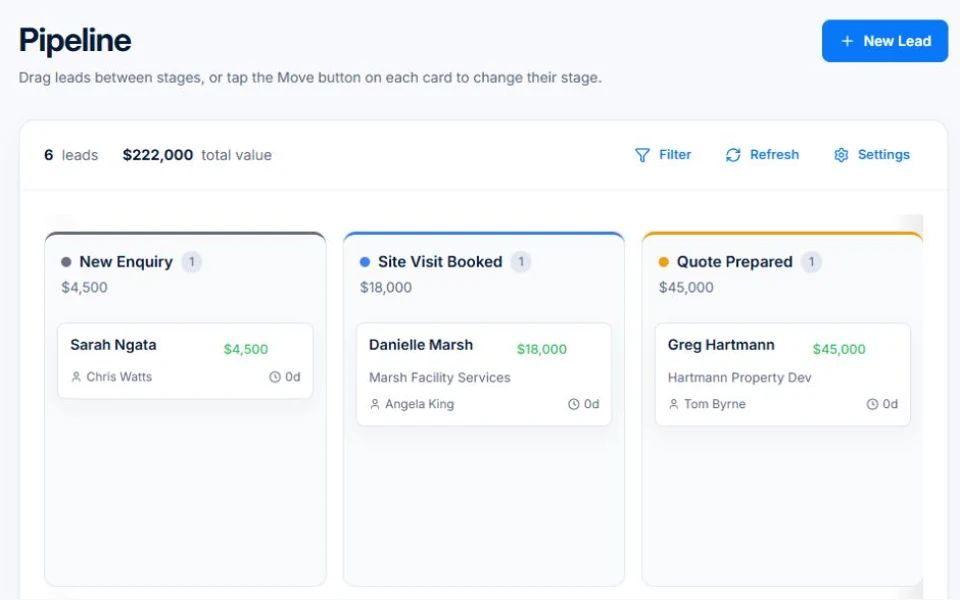
AxiomBlue connects customer and lead records with tasks and quotes, giving every enquiry a next action the team can find. On Professional, use the visual sales pipeline to review opportunities by stage and configure workflows for repeat follow-up. Keep the customer context as proposed work becomes a job.
A clearer view of the work you might win next.
Plan fit: Core customer, lead and task tracking are included in Basic. The visual sales pipeline, CRM dashboard and workflow automation require Professional. Compare plans →
The part of your day this changes
A new enquiry arrives while you are on a job. A quote needs a follow-up. Someone else spoke to the customer yesterday. Keep the context together so the next conversation starts in the right place.
Store customer and lead details with the information your team needs to continue the conversation. Use tasks to keep the next action visible.
On Professional, organise opportunities on the visual pipeline and move them through your sales stages as the conversation progresses.
Use Professional workflows for repeatable welcome messages and follow-up processes. Tailor the content and conditions to how your business sells.
Picture it in your business / Example
Record the enquiry, keep the next action with it and move the opportunity to the appropriate pipeline stage on Professional. When the customer is ready, continue the conversation with a quote.
A practical starting point
Add the contact details and useful context.
Keep the follow-up task visible and update the opportunity’s stage.
Prepare the scope and price when the customer is ready.
Know what’s included
Core customer, lead and task tracking are included in Basic. The visual sales pipeline, CRM dashboard and workflow automation require Professional.
Compare plans, limits and pricing →Check the workflow in detail
Explore the detail
Availability varies with plan, permissions and enabled features. Check plan inclusions.
See how this fits: win more work →Before you get started
Have a specific workflow in mind? Talk it through with us.
Customer records hold contact information and context. The Professional pipeline adds a visual way to organise sales opportunities by stage.
No. Core customer, lead and task tracking are included in Basic. Free-plan limits apply; visual pipeline and CRM dashboard features require Professional.
Yes, with Professional workflows. Review the message, recipient and conditions, then test the workflow before enabling it.
Keep the work connected
Considering a switch?
Use a familiar job to compare the way you work today with the way Axiom Blue handles it.
Check the quote, schedule, job record and invoice. Look for the details your team needs.
Compare usage limits, paid seats and specialist features. See plans and pricing →
Try your own quote on the free plan. Before moving existing records, ask us about your data and setup needs.
Make the next step a small one
You know where the friction is in your business. Open the demo and see how AxiomBlue handles it. Then start with your own quote on the free plan.
Free plan has usage limits. No time limit. No credit card.
Try a quote like one you send every week. Check the detail your customer will see.
Explore a job, its crew, time and materials. Look for the information you usually chase.
Compare the features and limits you need. See plans and inclusions →